



Search engine results pages are richer than ever before in an effort to enhance the user experience.
Users like to consume information in a variety of different ways, and Google caters to that — videos, People Also Ask boxes, featured snippets, and, of course, images, can appear on the SERP. The list goes on!
When you understand various SERP features and how you can optimize your content to appear in them, you can better align your content with search intent so your brand appears at every stage of the search journey.
Key Takeaways:
- Intent Drives Display: Image Packs adapt their layout—from horizontal carousels to product-focused "More Products" grids—based on whether the user is browsing or buying.
- Mobile Prominence: Image Pack frequency is 13% higher on mobile than desktop, making mobile-first image optimization (WebP/AVIF, responsive sizing) a non-negotiable requirement.
- Beyond Alt Text: Appearing in the Image Pack now requires a "Multimodal" approach, combining technical health, Structured Data, and contextual relevance.
Table of Contents
- What Is the Image Pack SERP Feature Features?
- Why Should SEOs Care About the Images SERP Feature?
- When Do Image Packs Appear?
- How Do Image Packs Appear?
- How to Optimize Your Images to Appear in the Image Pack
- How to Report on the Image Pack
What Is the Image Pack SERP Feature?
The image pack is a Google search feature that presents a cluster of images on the search engine results page. This is different from the image thumbnails that Google has started to show next to the title of an organic listing.
When a user clicks the image, a side panel expands that shows a larger version of the image and related images. It’s from here that a user can click through to your site’s URL.
Here’s an example of an image pack for the search query “iPhone 16.”:
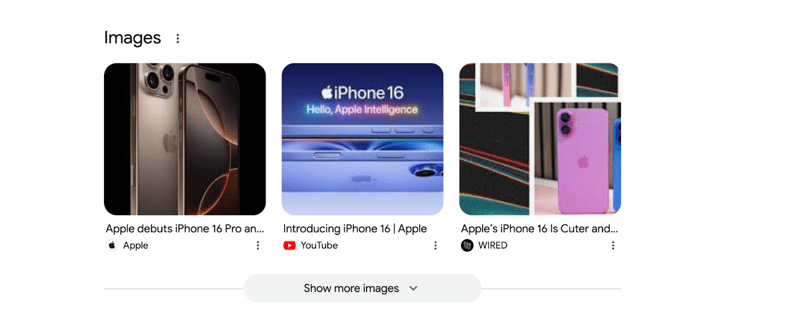 (An image pack on the main SERP page for “iPhone 16.”)
Recommended Reading: Video Carousel SERP Feature: SEO Impact (Research Included)
Why Should SEOs Care About the Images SERP Feature?
Google has searchers’ interest in mind. After all, the search engine wants to satisfy a user’s intent.
Some search queries clearly indicate that a user is looking for an image; for example, product-related queries (as we saw with the “iPhone 16” example) or keywords with informational intent.
When this is the case, Google will present an image pack because images are highly relevant to the target keyword.
So, what does that mean for SEO and AEO practitioners?
The image pack gives marketers the opportunity to drive more traffic and brand visibility.
Drive organic traffic:
Images in the image pack are dynamic and interactive — and include a link to the site they originate from. This means the images serve as another path for searchers to land on your site.
Boost Brand Visibility:
Search results are increasingly visual. Appearing in the image pack is another way to position your brand and content beyond a standard organic listing.
When Do Image Packs Appear in the SERP?
Based on our substantial Research Grid dataset, Image Pack appearances within the top 10 organic positions increased by 48.5% from 2024 to 2026.
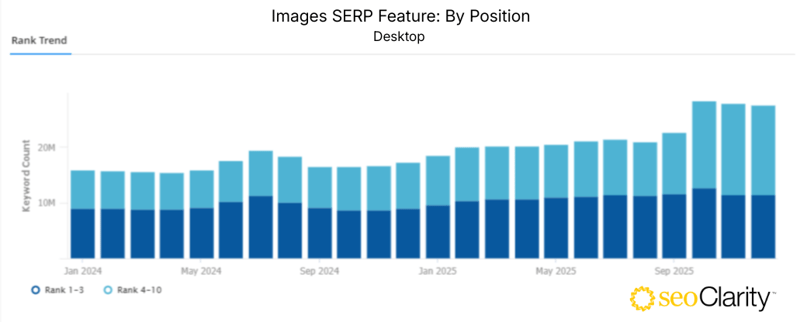
(Comparing Image Pack frequency from January 2024 to December 2025 in the seoClarity platform.)
Overall, however, there was an 8% decrease in the number of search queries that trigger the image pack across all rank positions, also over the past two years.
Here is a look at the frequency of the image pack for desktop compared to mobile:
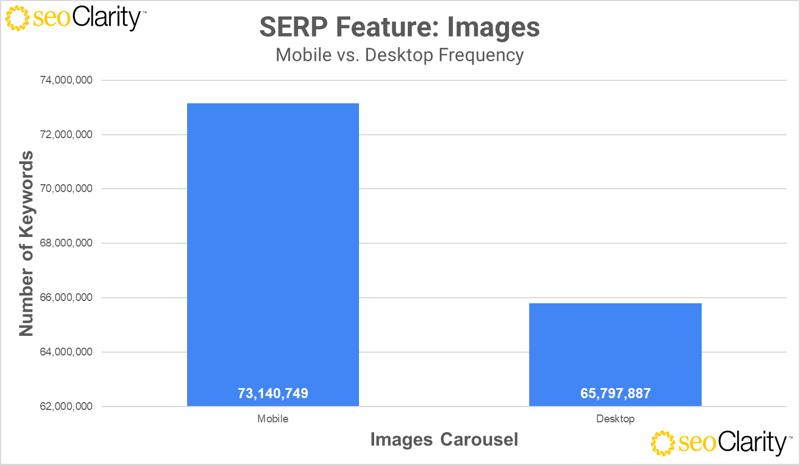 (December 2025 seoClarity Research Grid.)
The image pack appears on mobile nearly 13% more frequently than on desktop.
What about the industries that trigger the image pack the most?
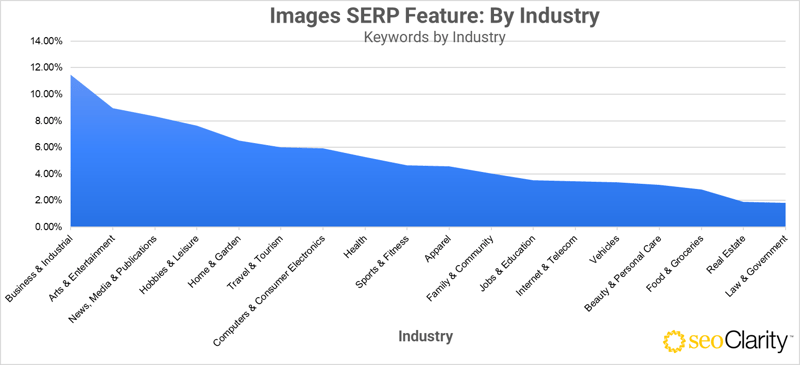 (December 2025 seoClarity Research Grid.)
The top industries whose related keywords trigger the local pack are:
- Business & Industrial
- Arts & Entertainment
- News, Media & Publications
- Hobbies & Leisure
- Home & Garden
This predominance of the Image Pack should further compel SEOs to take action to drive more traffic and boost brand visibility.
Recommended Reading: Impact of the Discussions and Forums Feature By Industry
How Do Image Packs Appear?
Not all image packs show on the SERP in the same way. The keyword’s intent can influence how the image presents itself.
Horizontal Image Pack Carousel
One way the SERP feature can appear is as a horizontal carousel at the top of the results page. Take a look at this image pack for the keyword “new york skyline.” Note that users have the option to expand the image pack if they click “Show more images.”
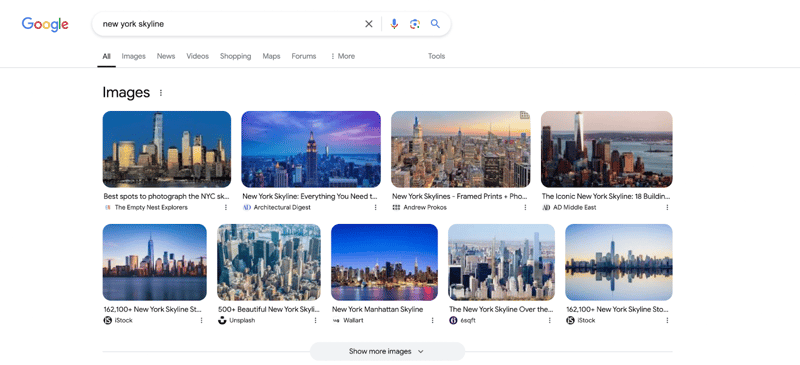 (This image pack for the keyword “new york skyline” is shown at the top of the SERP.)
Image Grids Embedded Within Organic Listings
The image pack doesn't always appear at the top of the SERP. In some cases, the images present themselves as a grid within the organic search listings.
In the example below for the search query “resume template,” the image grid is a 3x2 with the option to show more images.
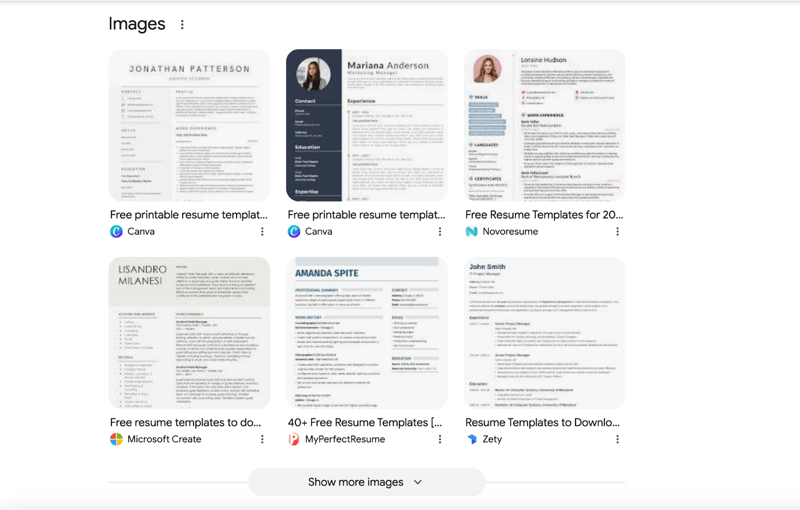 (An image pack that shows as a grid for the query “resume template.”)
Product-Focused Image Packs for Transactional Queries
When a search query has a transactional intent, the image pack could be a list of product recommendations.
Here, we return to our “iPhone 16” example. But instead of seeing a standard image pack, Google shows these images as “More Products.”
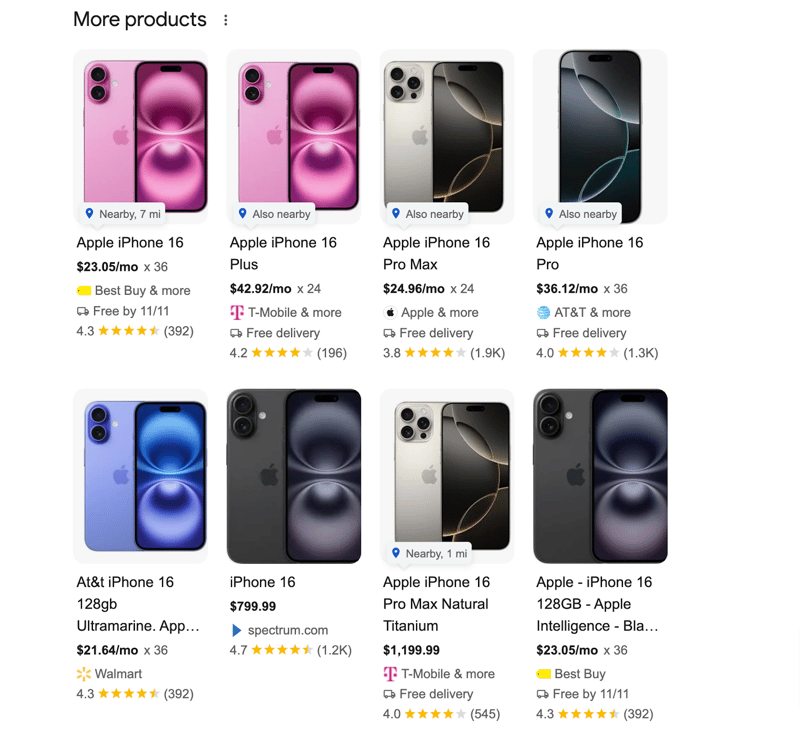
(A product-related image pack for the search query “iPhone 16.”)
Recommended Reading: Popular Products SERP Feature: SEO Impact [+ Research]
How to Optimize Your Images to Appear in the Image Pack
Image optimization is crucial if you want your images to rank across search engines, including image-based SERP features and image search results.
There are several core components that influence how images rank and are selected across Google Search, Image Packs, and AI-generated results:
- Alt Text & Contextual Relevance: Alt text should accurately describe the image and align with the page’s primary entities and intent.
- Image Size & Prominence: Google evaluates image dimensions, placement, and whether an image is the primary visual element of the page.
- Crawlability & Indexation: Images must be accessible, indexable, and not blocked by robots.txt, lazy-loading errors, or JavaScript issues.
- Surrounding Content Signals: Captions, headings, and nearby text help Google understand how the image supports the topic.
- Structured Data: Schema markup clarifies image relationships, increasing eligibility for rich results and AI summaries.
Recommended Reading: How to Optimize for “From Sources Across the Web”
How to Report on the Image Pack
Once you’ve optimized your images, you’ll want to monitor your performance to see if your optimizations are working.
Here, you’ll want to track image packs (and their rank on the SERPs for a particular keyword) plus your domain’s rank within that image pack.
You’ll be able to do this if you use an SEO platform like seoClarity that has SERP features visibility tracking.
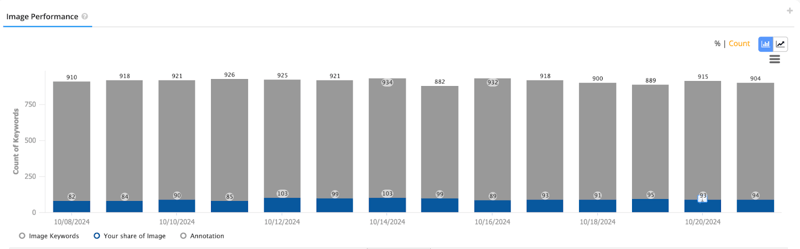 (A domain’s share of the image pack compared to the total number of tracked keywords that trigger the image pack.)
It’s also helpful to see a trended view of your performance over time to see when an image pack rank was gained or lost.
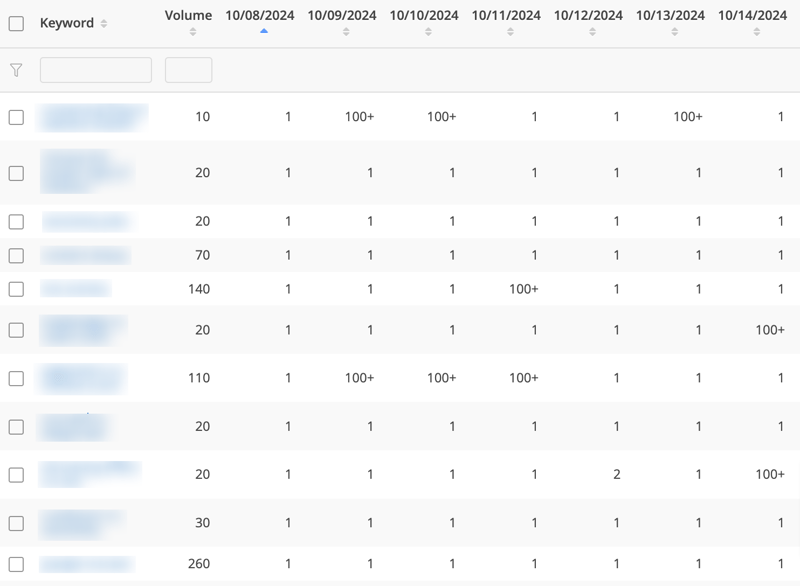 (This trended view in the seoClarity platform shows the date a specific keyword started to rank in the image pack.)
FAQs About Google’s Image Pack SERP Feature
How long does it take for a new image to appear in the Image Pack?
There is no fixed timeline, but it typically ranges from a few days to several weeks. Because Google must crawl both the image file and the surrounding page content to establish context, you can accelerate the process by submitting an updated Image Sitemap and ensuring the page is indexed via Google Search Console.
Does image file size impact ranking within the Image Pack?
Directly, yes. Page speed is a confirmed ranking factor, and large, unoptimized images trigger high Largest Contentful Paint (LCP) scores. In the mobile-dominant landscape of 2026, Google prioritizes images that load instantly. Aim for file sizes under 100KB whenever possible without sacrificing visual clarity.
Can I rank in the Image Pack if I use stock photos?
It is significantly harder. Google’s algorithms are increasingly adept at identifying duplicate visual content. Original photography or custom-designed graphics carry higher topical authority and are more likely to be featured in the grid than the same stock image used by hundreds of other sites.
Is there a specific aspect ratio Google prefers for the Image Pack?
While Google is flexible, most successful Image Pack entries utilize standard ratios like 4:3 or 16:9. Extreme vertical or horizontal crops can lead to awkward thumbnail centering in the SERP grid. Centering the "hero" subject of your image ensures it remains the focal point regardless of how Google crops the preview.
Do AI-generated images rank in the Image Pack?
Yes, provided they meet Google’s E-E-A-T (Experience, Expertise, Authoritativeness, and Trustworthiness) standards. However, Google emphasizes "people-first content," so AI images should be high-quality, relevant, and not used to spread misinformation.
Conclusion
Optimizing for the image pack is another way to position your content in front of your audience in a way that aligns with their search intent, ensuring your brand is seen in various places along the searcher’s journey.
Leverage an SEO platform to track and monitor your results so you can adjust your SEO and AEO strategy.
.png?width=140&name=Untitled%20design%20(10).png)
Comments
Currently, there are no comments. Be the first to post one!