



AirOps pairs AI visibility tracking with content production. Its platform tracks how AI search engines describe your brand, then uses AI agents and workflows to create, refresh, and publish content in response.
That makes an AirOps evaluation two decisions in one. You're assessing a measurement tool and a content production system, and both draw on the same monthly allowance.
Below, we explain how AirOps' Insights, Actions, and Context areas fit together, model how much of a Pro task allowance tracking alone could consume, and list 13 questions to settle during a demo.
Editorial disclosure: seoClarity offers technology that may compete with AirOps. We did not test AirOps directly for this article. This analysis is based on publicly available information, primarily AirOps' website and documentation, reviewed on October 13 and 14, 2026. Product details and pricing can change, so verify your requirements directly with AirOps.
Table of Contents
- Key Takeaways
- What Is AirOps and How Does It Work?
- What Does AirOps Track in AI Search?
- How Does AirOps Turn Insights Into Content?
- How Is AirOps Priced?
- What Should Enterprise Teams Evaluate Beyond Features?
- What Do Customer Reviews Say About AirOps?
- Which Enterprise Teams May Want to Shortlist AirOps?
- Questions to Ask During an AirOps Demonstration
- How seoClarity ArcAI Approaches Enterprise AI Visibility
Key Takeaways
- Paid prices aren't published, and plan allowances differ across AirOps' own pages. Solo is free to start. Pro and Enterprise prices weren't listed when we checked.
- AI visibility tracking and content production share one task balance. How many prompts, engines, and personas you track directly affects how much content work your allowance covers.
- Multi-engine tracking starts at Pro. Solo covers ChatGPT only. Claude is included by default on Enterprise and uses four tasks per answer instead of one.
- Security documentation is public. AirOps states that it is SOC 2 Type II compliant and documents single sign-on (SSO) through Okta.
- G2 reviewers rate AirOps highly, but most work at small and mid-market companies, and ease-of-use scores trail the category average.
What Is AirOps and How Does It Work?
AirOps describes itself as “the partner for the AI-first buyer journey” and calls its approach “content engineering.” According to its AI Instructions page, the company was founded in 2022 and offers expert services alongside its software.
AirOps' documentation organizes the platform into three areas:
- Insights: how your brand appears in AI search, on your own site, across external sources and in ChatGPT ads, plus recommended opportunities.
- Actions: Playbooks, Grids and Workflows that turn insights into content work.
- Context: Brand Kits, Knowledge Bases and integrations that give AI agents your brand voice, product information and publishing connections.
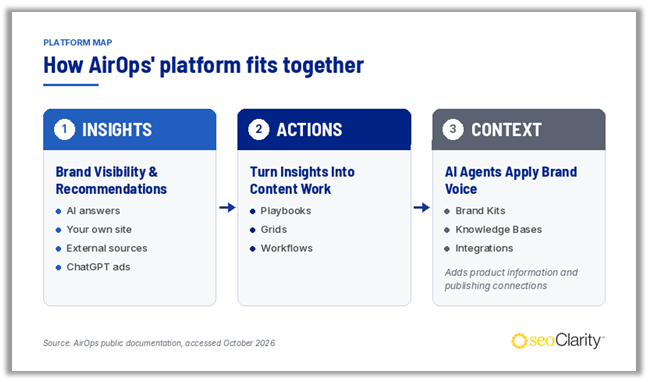
How AirOps' Insights, Actions, and Context areas connect, based on its public documentation
What Does AirOps Track in AI Search?
AI Platform Coverage
AirOps' public sources list different AI engines. Its Insights documentation names ChatGPT, Gemini, Perplexity, Google AI Mode, Google AI Overviews, Microsoft Copilot and Grok, and adds Claude “if your plan and configuration allow it.” Its AI Instructions page lists six engines, including Claude but not Copilot or Grok. The pricing page says Solo covers ChatGPT only and Pro covers “7+ answer engines.”
According to the Insights settings, Claude is enabled by default on Enterprise, and other plans need to contact their account team. By default, AirOps collects one answer per prompt, per platform, per day. Enterprise customers can request several answer runs a day.
Visibility, Citation, and Sentiment Metrics
Insights reports mention rate, share of voice, average position, citations, and theme-based sentiment, with a leaderboard of up to 10 competitors. You can filter by region, platform, topic, persona, and prompt type, and compare prompts by buyer stage, from awareness to purchase.
The documentation names these metrics but doesn't define how each is calculated, so AirOps figures may not line up directly with another platform's. A collection status indicator also shows whether data for each platform is “Collecting” or “Delayed,” which helps you tell a data gap from a real drop in visibility.
Prompt Recommendations and Demand Signals
AirOps adds recommended prompts weekly, based on your Brand Kit and “market data.” Demand appears as a relative Low, Medium or High rating, and the documentation doesn't name the data source. It also shows whether answers are likely to mention or cite you. These are estimates, not measured results, so check them against your own search data.
Onsite and Offsite Views
On your own site, AirOps says its Page360 view combines SEO, AI visibility and GA4 data. Content Updates logs pages published or refreshed through AirOps so you can relate changes to citations and clicks. Agent Analytics uses CDN logs to separate AI training crawls, AI search crawls and AI agent visits.
Off your site, the Offsite views show which external domains, YouTube videos, and Reddit communities that AI answers cite.
How Does AirOps Turn Insights Into Content?
AirOps' Opportunities view groups recommended actions into four types: creating content where competitors appear and you don't, refreshing pages competitors outperform, outreach to frequently cited domains, and Reddit conversations to join. You can send selected opportunities to a Grid for Playbook runs. The documentation doesn't say how opportunities are ranked.
The Actions area then offers three ways to produce content:
- Playbooks: AI agent instructions written in natural language, with human review checkpoints.
- Grids: a spreadsheet-style workspace for running Playbooks or Workflows across many pages, then reviewing and publishing the output.
- Workflows: a visual builder for multi-step processes, including approval steps and publishing to a CMS.
AirOps lists CMS connections including WordPress, Webflow, Contentful and Sanity, and project-management integrations such as Asana, Monday.com and Notion. For enterprise teams, the key question is governance. When agents can draft and publish, you'll want to know who approves output, which roles can publish, and what connected AI tools are allowed to change.
How Is AirOps Priced?
AirOps prices by tasks, which it calls the “currency” of the platform. Under combined task billing, Workflows, Playbooks, and Insights answers draw on the same balance, according to its billing documentation.
| Solo | Pro | Enterprise | |
|---|---|---|---|
| Price | Start for free | Not published | Custom |
| Monthly tasks (pricing page) | 35,000 | 100,000 | Custom |
| Monthly tasks (visibility page) | 20,000 | 75,000 | Custom |
| Tracked prompts and pages | 100 | 250 | Custom |
| AI engines | ChatGPT only | “7+” | Custom; Claude included by default |
| Brand Kits / Knowledge Bases | 1 / 3 | 1 / 5 | Unlimited |
| Users | Single user | Unlimited seats | Unlimited seats |
| Support | Community and live chat | Community and live chat | Dedicated account manager, 1:1 onboarding |
Source: AirOps pricing and AI search visibility pages, checked October 13, 2026. Prompt limits appear only on the visibility page.
The two AirOps pages list different task allowances for Solo and Pro. The pricing FAQ also mentions “Scale” and “Agency” plans that don't appear on the plan cards. It lists extra Solo tasks at $0.025 each and says allowances reset monthly.
How Much of Your Allowance Does Tracking Use?
AirOps publishes the formula. For each tracked prompt, monthly answers equal platforms × regions × (1 + named personas) × 30 days. Most engines use one task per answer, and a Claude answer uses four.
Here's our illustration, not an AirOps quote, using Pro's 250 tracked prompts, one region, and no extra personas:
- Five standard engines (ChatGPT, Gemini, Perplexity, AI Mode and AI Overviews): 250 × 5 × 30 = 37,500 tasks a month
- Adding Claude, if your account team enables it: 250 × 30 × 4 = 30,000 more
- Total: 67,500 tasks, before any content production
That leaves about 32,500 tasks for content work against the pricing page's 100,000, or 7,500 against the visibility page's 75,000. Each named persona adds another full set of answers for every engine except AI Overviews. Copilot and Grok are left out because their task cost isn't published.
The remaining balance is hard to translate into a number of articles. Workflow steps that call an AirOps-hosted model use tasks “proportional to usage,” and the documentation doesn't give a typical cost for a Playbook run.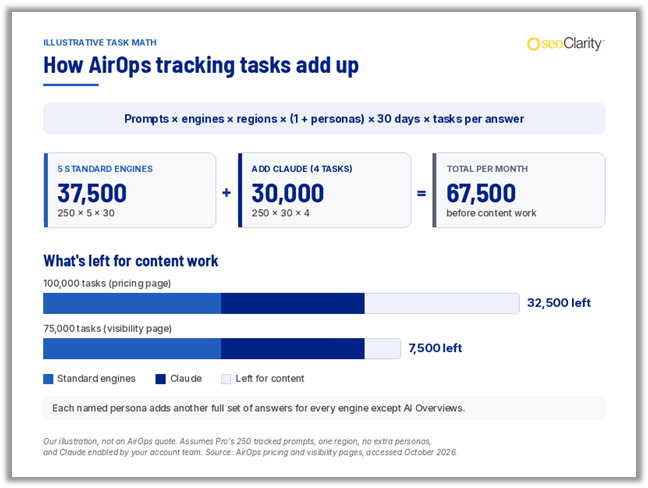
Illustrative task calculator showing how prompts, engines, personas, and Claude's four-task answers add up against a monthly allowance
What Should Enterprise Teams Evaluate Beyond Features?
Data Access Through API and MCP
The Insights API returns metrics, prompts, citations, page data, and agent crawl counts, which is useful for warehouse or BI reporting. We couldn't confirm rate limits in the public materials reviewed.
The AirOps MCP server connects tools such as Claude, Cursor, and VS Code to your workspace. Model Context Protocol (MCP) is the open standard that lets AI assistants connect to outside data and tools. AirOps' server can read metrics, and it can also update Brand Kits, publish approved drafts, and run Playbooks. Data access requires a paid workspace.
Identity, Roles and Security
AirOps' role documentation lists Admin only on Solo, Admin and Member on Pro, and five fixed roles plus custom roles on Enterprise. It says permissions apply across the web app, its Quill assistant, and MCP.
AirOps documents Okta SSO using OIDC. We couldn't confirm SAML support, SCIM provisioning, audit logs, or which plans include SSO in the public materials reviewed. Its security page states that “AirOps is SOC 2 Type II compliant” and offers the report under NDA. It also describes AES-256 encryption at rest, a data processing agreement, and zero data retention with OpenAI for Enterprise customers.
Agent Analytics Prerequisites
Agent Analytics connects through Cloudflare (Logpush or Worker), Amazon CloudFront, Netlify or Vercel. If your site runs on another CDN or your own servers, we couldn't confirm a supported setup in the public materials reviewed. Involve your web team early.
What Do Customer Reviews Say About AirOps?
AirOps holds a 4.7 out of 5 rating from 134 reviews on G2, checked October 14, 2026. About 56% of reviewers work at small businesses, 34% at mid-market companies, and 10% at enterprises.
G2's summary says reviewers praise the Quill AI copilot, Playbook and Workflow building, and time saved on content. Its recurring complaint is that the tool's breadth can leave new users unsure where to start. Ease-of-use and ease-of-setup scores (8.2 and 8.3 out of 10) sit below the category average of 9.1. Because enterprise reviewers are a small share of the sample, ask for enterprise references in your industry.
Which Enterprise Teams May Want to Shortlist AirOps?
AirOps may fit content-led teams that want visibility tracking and content production in one place, particularly if they publish to a supported CMS and lack the capacity to act on visibility data themselves. Its documented API, MCP server, SSO, and SOC 2 Type II statement give IT teams a starting point for review.
Evaluate carefully if you already have established content workflows or if separate teams own measurement and production budgets. In those cases, the shared task balance and agents' ability to publish deserve close scrutiny, and the conflicting public allowances make a written quote essential.
Questions to Ask During an AirOps Demonstration
Plans and tasks
- Which plan are we quoted on, and what are its exact task and tracked-prompt allowances?
- Can you model task use for our prompts, engines, regions, and personas alongside our content volume?
- How are overages priced above Solo, and can we set hard usage limits?
Engines and data collection
- Which AI engines are included in our plan, and what do Copilot and Grok answers cost?
- Can we track some prompts less often than daily to conserve tasks?
- How are mention rate, share of voice, and average position calculated?
- What's the source of the demand ratings on recommended prompts?
Content governance
- Which roles can publish to our CMS, and how are approvals enforced?
- Which MCP write actions can we restrict, and are those actions recorded in an audit log?
Data and security
- Are SAML SSO and SCIM provisioning available, and on which plans?
- Can we see the current SOC 2 report period, subprocessor list, and data hosting regions?
Services
- What does AirOps Services include, and how is it priced?
- Do Services hours or agent builds draw on our task balance?
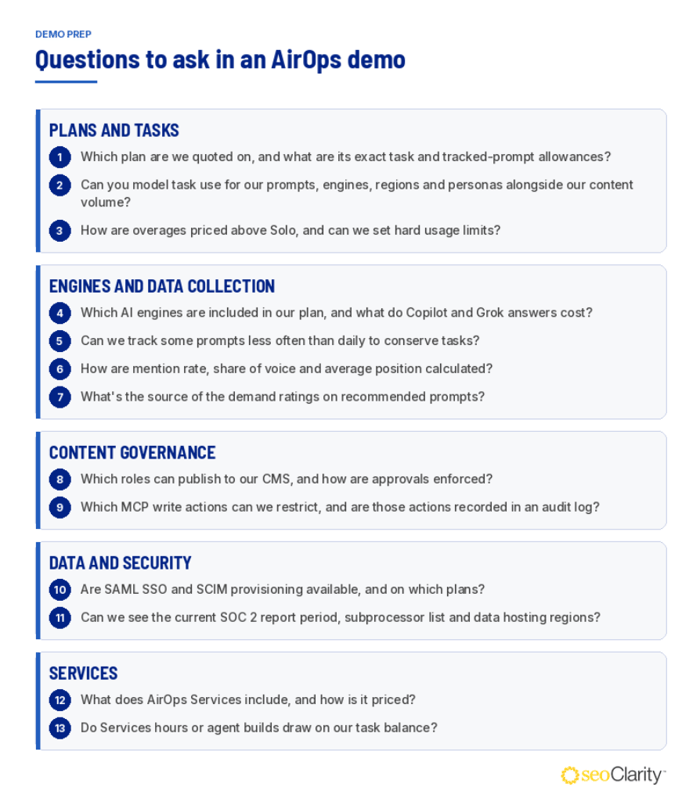
Checklist grouping the 13 demonstration questions to ask in an AirOps demo
How seoClarity ArcAI Approaches Enterprise AI Visibility
seoClarity ArcAI makes all supported AI engines available across its plans. Clients can select the AI search engines most relevant to their audiences and markets. ArcAI usage is measured in Question Queries, where each prompt tracked on one AI engine in one location counts as one Question Query. ArcAI pricing is custom. Contact seoClarity sales for a quote.
ArcAI prompt research is grounded in real search demand, and maps prompts to buyer-journey stages, from awareness through retention. It can track prompts daily, weekly, or monthly, with weekly as the default. For content work, ArcAI Content Agents work inside Google Docs, Microsoft Word, or your existing CMS through MCP and API.
For Brand Accuracy, ArcAI Accuracy builds a source-of-truth index from the sections of your site that contain factual claims about your brand, products, services, and policies. It then checks the AI answers tracked in ArcAI Visibility against that index and flags direct conflicts, quantitative mismatches, missing qualifiers, and insufficient evidence. ArcAI Accuracy is available as an add-on.
seoClarity subscriptions include a Client Success team at no extra cost, covering a client success manager, onboarding and training, and technical support through live chat, email, and phone.

Comments
Currently, there are no comments. Be the first to post one!