



It's the end of the month. Your AI visibility report shows that your brand appeared in more ChatGPT answers than last month, and your VP asks, "Was that because of our new comparison guide or something else?" You have a chart, but you can't say which of your changes lined up with it.
Determining which specific optimization efforts have impacted AI visibility is a common challenge for many AEO teams.
Tracking your brand's presence in AI search engines requires a reliable system of record to connect your team's content updates with visibility shifts.
By logging every change alongside your AI visibility trend, you can accurately identify whether a jump in mentions is due to your work, competitor actions, or algorithmic updates.
This guide outlines a four-step framework to establish a baseline, document updates as they happen, and review performance systematically.
Table of Contents
- What Is AI Search Visibility?
- Why Is It Hard to Connect Your Work to Changes in AI Search Visibility?
- What Is a System of Record for AI Search?
- How Do You Build a System of Record for AI Search?
- Frequently Asked Questions
What Is AI Search Visibility?
AI search visibility is how often, and how prominently, AI search engines such as ChatGPT, Google AI Mode, Google AI Overviews, Gemini, and Perplexity mention or cite your brand across a fixed set of tracked prompts (the questions people ask AI assistants).
We suggest grouping your tracked prompts by topic, because a change in AI visibility usually affects one topic, not your whole brand.
| Metric | What it measures |
|---|---|
| Mention rate | The share of AI answers that mention your brand for the prompts you track |
| Citation rate | The share of AI answers that link to your website as a source |
| Average position | Where your brand appears in an AI answer when it is mentioned |
| Share against competitors | How your mentions compare with the mentions of the brands you compete with |
Why Is It Hard to Connect Your Work to Changes in AI Search Visibility?
It's hard to connect your work to AI search visibility because visibility often shifts for several different reasons at the same time, and your own changes are only some of them.
There are many potential overlapping causes:
- Your own changes: you publish a guide, refresh a product page, or restructure your FAQ pages.
- Other people's content: a review site, a Reddit thread, or a news article starts or stops mentioning your brand.
- Competitors: a competitor launches a product or a campaign and starts appearing in the same AI answers.
- The AI engines: an AI engine changes how it answers or which sources it cites, sometimes without an announcement.
- Seasonality and news: some questions are asked more often at certain times of year or after a major event.
A single trend line can't show which of these mattered. Months later, nobody on the team remembers or can pinpoint which specific optimizations or content initiatives (i.e. a refreshed guide, new FAQ pages, a site fix, or a PR push) made the difference the week the line moved.
What Is a System of Record for AI Search?
The way to connect your work to changes in AI search visibility is to keep a system of record.
A system of record for AI search is a shared, dated log of the changes your team makes that could affect how AI search engines treat your brand, such as content, site, PR, and campaign changes, with a short title and a one-sentence description of each.
Most teams already have the visibility numbers. What they are missing is a record of what happened around those numbers.
When a number moves, the team looks at the record for the same dates and sees what content initiatives took place around then. If the record shows nothing from your side, the change probably came from outside, such as a competitor move or an AI engine update.
The same record works for every signal your team watches: AI visibility, sentiment (whether AI answers describe the brand positively, neutrally, or negatively), organic or AI assistant traffic in web analytics, and AI crawler visits in server or bot logs.
A note next to a change doesn't prove that the change caused a movement. It tells the team where to look first.
How Do You Build a System of Record for AI Search?
You build a system of record for AI search in four steps:
- Set a baseline
- Log every change as it happens
- Review the record on a schedule
- Report changes together with what happened around them
Each step below explains the method, then shows how to streamline the process in Clarity ArcAI.
Step 1: Set a Baseline
Track the same prompts for a few weeks before judging any change, so you know what normal search visibility fluctuations look like. Changing the prompt set midway can make the trend jump for reasons unrelated to your brand.
If you can, also pick a similar topic that you don't plan to change. That way you have something to compare against later.
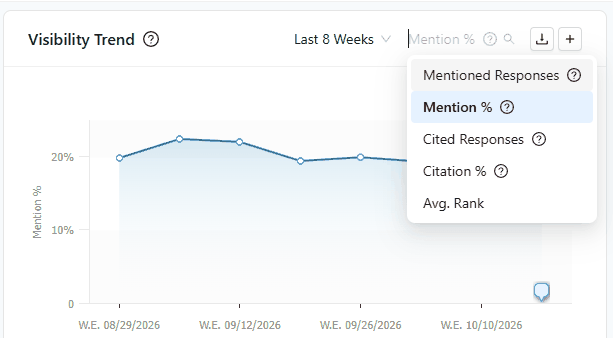
In Clarity ArcAI: the Visibility Trend chart shows your brand's Mention %, Citation %, or average rank across the AI engines you track, by day, week, or month. Pick the metric and date range you will report on, and use the same ones every time.
Step 2: Log Every Change As It Happens
Add a note on the day your team ships a change, not at the end of the month. Make sure to log changes that might hurt visibility as well as wins, and use the same categories every time so the notes are easy to scan.
Outside events, such as a competitor launch, are worth a note too.
| Category | Examples worth a note |
|---|---|
| Content | New guide or FAQ page, major page refresh, page removed or merged |
| Site and technical | Site migration, new structured data, pages blocked or unblocked for AI crawlers |
| PR and earned media | Press coverage, analyst report, podcast or webinar appearance |
| Community and reviews | Large Reddit or forum thread, new review site listing, review campaign |
| Competitors | Competitor product launch, rebrand or major campaign |
| AI engines | An AI engine changes how it answers or which sources it shows |
| Business events | Product launch, pricing change, new market, rebrand |
We suggest writing every note the same way, so anyone on the team can scan the record. A good note looks like this:
| Field | What to write | Example |
|---|---|---|
| Date | The day the change went live | October 8, 2026 |
| Title | What changed, in a few specific words | Refreshed the pricing FAQ page |
| Description | One sentence on what was done and where | Rewrote the answers on the pricing FAQ to cover plan limits and add-ons. |
| Group | The category of change | Content updates |
| Scope | Whole brand, or the prompt topic or tag it affects | Prompt topic: Pricing |
In Clarity ArcAI: add an annotation from the Visibility Trend chart. Each annotation has a title, an optional description, a group, and a date or date range. Logging a note takes less than a minute.
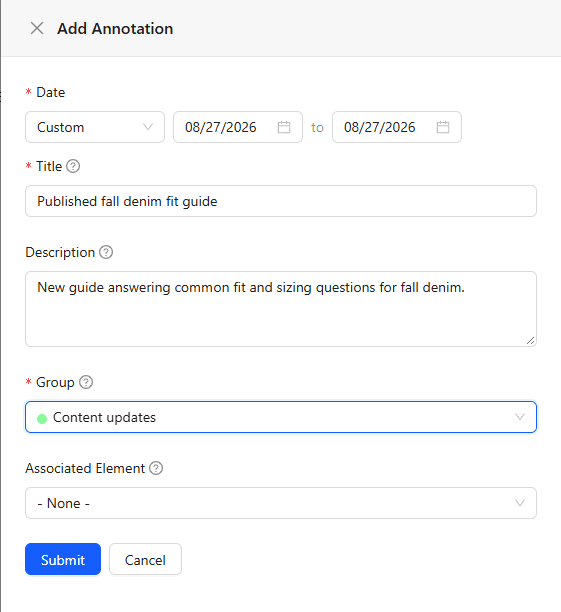
Put each note in a colored group, such as Content updates, PR, or Competitors, so the chart shows at a glance whether a note is your own work or an outside event.
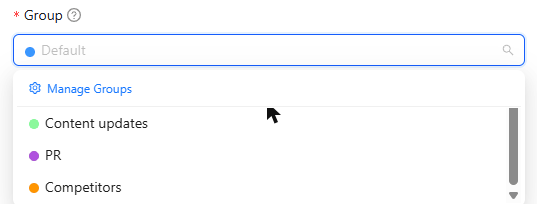
Clarity ArcAI also includes built-in groups such as Algo Update, Technical Changes, and Platform Updates, where seoClarity logs AI engine updates for every account. This makes it easy to distinguish your own changes from changes on the AI engine side.
Then choose the scope of the note:
| Scope | Use it for | Why it helps |
|---|---|---|
| One day | A launch, a press mention, a site release, an AI engine change | The flag sits on the exact day or week the line moved, so the timing is easy to compare. |
| Date range | A campaign, a sale, a site migration, a content push that runs for weeks | One note covers the whole period. For long ranges, the note can show only on the start and end dates to keep the chart clean. |
| Whole brand | Events that affect every prompt, such as site changes, PR, or an AI engine update | The note shows whichever topic is selected, so major events are never hidden. |
| Prompt topic | Work aimed at one area, such as a pricing page or a how-to guide | The note shows only when someone looks at that topic, so each topic owner sees their own context without crowding everyone else's chart. |
| Prompt tag | Groups of prompts that cut across topics, such as comparison or seasonal prompts | The same focus as a topic note, organized the way your team tags its prompts. |
Coming soon: Clarity ArcAI annotations are coming to the Clarity ArcAI MCP server. You'll be able to see all of your team's annotations and add new ones from the AI assistant you already work in, as soon as you make a change, without opening the chart.
Step 3: Review the Record On a Schedule
Once a week, compare the visibility trend with the notes. Check whether anything moved after a change, and whether anything moved with no change logged.
Look at the topic you changed, not only the brand-wide total, because a total can hide a large change in one topic. Then compare it with a similar topic you didn't change: if the changed topic moved and the untouched one didn't, the link to your work is much stronger; if both moved, something outside your work probably moved them.
Also check sentiment, AI traffic in your analytics, and AI crawler visits in your bot logs for the same dates.
Two cautions: don't react to a single day since AI answers vary from day to day. Instead, judge weekly or monthly trends. And don't claim credit too fast: a rise after your change is a good sign, not proof.
In Clarity ArcAI: each annotation appears as a colored flag on the Visibility Trend chart. Hover a flag to read the note next to the visibility numbers for that day or week.
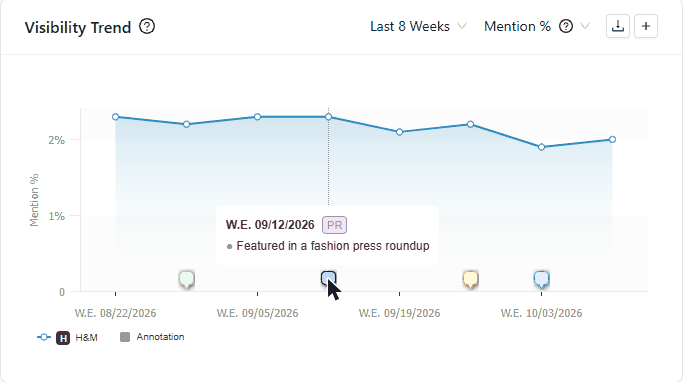
Hover a flag to read the note. Example notes on a demo account.
Click a flag to see every note for that period in one timeline. Filter the page to a topic or prompt tag to see the notes linked to it, or keep all topics selected to see the brand-wide notes. Sentiment for the same dates is in Clarity ArcAI too.
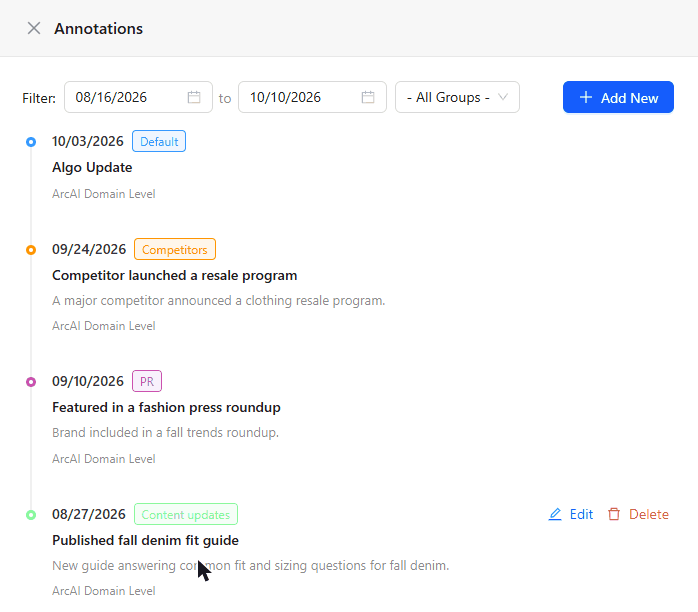
Click a flag to see every note in one timeline.
Step 4: Report With the Context
In monthly updates, show the trend with the notes on it. "Mentions rose in the weeks after we published the comparison guide" is easier for leadership to remember than "Mentions rose 3 points."
Say what happened around the change, and let the trend speak for itself.
In Clarity ArcAI: everyone on your team's Clarity ArcAI account sees the same annotations, so the whole team reports from the same record and the record stays when people change roles. Annotations belong to the account, not to a brand profile, so a note about a competitor launch also shows when you compare against that competitor.
Frequently Asked Questions
How do I know if my content change affected my AI visibility?
Log the change on the day it takes place, then compare the AI visibility trend for the topic you changed over the following weeks. If the changed topic moved around that date, a similar topic you didn't change stayed flat, and competitors and AI engines did not change at the same time, your change is a likely factor. A system of record makes this check quick, because the note sits next to the trend.
Why did my AI visibility drop?
AI visibility usually drops because of a change to your own content or site, new or lost mentions on other websites, a competitor appearing in the same AI answers, an AI engine changing how it answers or which sources it cites, or a seasonal shift in what people ask. A system of record that logs each of these events by date shows which one lines up with the drop.
Why did ChatGPT stop mentioning my brand?
ChatGPT can stop mentioning a brand when the sources it relies on change, when competitors publish content that answers the same questions, or when OpenAI changes how ChatGPT answers. Check your own record of changes and the AI engine updates logged in Clarity ArcAI for the same dates, then compare the topics where mentions fell.
What is an AI visibility annotation?
An AI visibility annotation is a dated note on an AI visibility trend chart that records an event, such as a content launch, a press mention, or an AI engine update, so the team can see what happened when visibility changed.
Can an annotation cover more than one day?
Yes. A Clarity ArcAI annotation can cover a single day or a date range, such as a four-week campaign. For long ranges, the note can show only on the start and end dates.
Can an annotation apply to only one topic?
Yes. A Clarity ArcAI annotation can apply to the whole brand, to one prompt topic, or to one prompt tag. Topic and tag notes appear when the chart is filtered to that topic or tag.
Does an annotation prove that a change caused a visibility shift?
No. An annotation shows what happened around the time visibility changed. It tells the team where to look first, and the team compares it with competitors, topics, sentiment, traffic, and bot logs before drawing a conclusion.
Who can see Clarity ArcAI annotations?
Everyone on the same Clarity ArcAI account sees the same annotations, so the record stays with the team when people change roles.
Does seoClarity log AI engine updates for me?
Yes. seoClarity logs AI engine updates in the built-in annotation groups of every Clarity ArcAI account, so changes on the AI engine side appear on the Visibility Trend chart next to your team's own notes.
Will Clarity ArcAI annotations be available in AI assistants?
Annotations are coming soon to the Clarity ArcAI MCP server, which will let users see their annotations and create new ones from an AI assistant.
See how Clarity ArcAI helps you connect your work to changes in AI search visibility.



Comments
Currently, there are no comments. Be the first to post one!