



Tracking AI visibility across a brand portfolio isn't as simple as monitoring one company name against a shared list of competitors.
Different brands, sub-brands, and product lines show up in different AI-generated answers. Their competitors aren't necessarily the same, either. If you measure them against one company-wide competitor list, you can end up with a very misleading picture of where each brand actually stands.
For example, in our analysis of one major retailer with multiple sub-brands, it had a 98% share of voice against several of its largest fashion competitors. But when we compared it with the home brands AI engines actually recommend, that figure dropped to 6.5%.
Same answers. Different competitor sets. Very different conclusions.
That's why multi-brand AI visibility tracking needs to account for how each brand competes in its own category, rather than treating the entire portfolio as one entity. We’ll show you how to do this below.
Key takeaways
- Map competitors by category, not parent company: AI engines recommend different competitors for different product lines. Base your share of voice calculations on the specific rivals AI answers actually name for each sector.
- Isolate brands with strict matching rules: Give every sub-brand or product line its own tracking profile with precise mention and citation parameters. This prevents overlapping names (like "Zara" vs. "Zara Home") from cross-contaminating your visibility metrics.
- Separate branded and non-branded prompts: Branded prompts measure existing recognition and artificially inflate overall visibility scores. Non-branded prompts reveal your true competitive share of voice when buyers are exploring category options.
- Consolidate tracking to preserve historical data: Avoid platforms that require launching a new tracking project for every sub-brand. Instead, use Clarity ArcAI, which applies distinct brand profiles to a single pool of prompt data, allowing you to instantly analyze historical trends without duplicate tracking costs.
Table of Contents:
- What is multi-brand AI visibility tracking?
- Why does one competitor list give the wrong answer for a portfolio?
- How to track AI visibility across brands, sub-brands and product lines
- How do you calculate AI share of voice for each brand?
- How do AI visibility tools handle multiple brands?
- What should you ask an AI visibility vendor about multi-brand tracking?
- FAQ
What Is Multi-Brand AI Visibility Tracking?
Multi-brand AI visibility tracking measures how often each brand, sub-brand, or product line appears in AI-generated answers, including mentions and citations across ChatGPT, Gemini, Perplexity, Google AI Mode, and Copilot.
Each brand needs to be measured in its own market, with relevant prompts, mention and citation rules, and competitors based on the brands AI engines actually recommend. Teams can then compare individual brands or view performance across the entire portfolio.
For example, a retailer with fashion, home, and beauty divisions faces three different competitive markets. Tracking them as one brand can hide where visibility is growing, where competitors are gaining ground, and which divisions need attention.
Why Does One Competitor List Give the Wrong Answer for a Portfolio?
Because AI share of voice depends on which competitors you include in the calculation. And when those competitors don't reflect the market a particular brand operates in, the resulting percentage can be misleading.
Our H&M analysis illustrates the problem.
We tracked 41 non-branded prompts across women's fashion, denim, home textiles, and home decor in ChatGPT, Gemini, Perplexity, Google AI Mode, and Copilot over six weeks.
Across five AI platforms, those prompts generated 1,230 answers. We then calculated H&M's share of voice using two different competitor sets for each line of business.
| H&M line of business | Competitor list | Mention Rate (%) |
|---|---|---|
| H&M Home | Fashion rivals: Zara, Uniqlo, Mango | 98% |
| H&M Home | Top 5 home brands named by AI: IKEA, Brooklinen, West Elm, Target, Pottery Barn | 6.5% |
| H&M fashion | Fast-fashion rivals: Zara, Uniqlo, Mango | 20.7% |
| H&M fashion | Top 5 fashion brands named by AI: Levi's, Madewell, Uniqlo, Lululemon, Everlane | 10.0% |
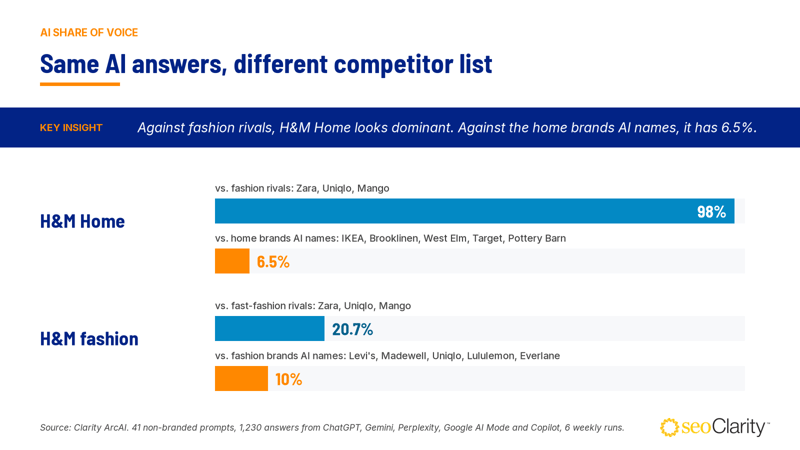 The answers are identical in each pair of rows; only the competitor list changes.
H&M Home scores 98% against fashion rivals because Zara, Uniqlo, and Mango almost never appear in home-decor answers. Against the home brands that AI engines recommend to shoppers, H&M Home ranks sixth.
That's a much more useful picture of its competitive position.
The same issue affects H&M fashion. Its 20.7% share of voice against fast-fashion rivals falls to 10% when measured against a broader set of fashion brands.
For enterprise teams managing multiple brands, this is an important distinction: a high AI visibility score doesn't necessarily mean a brand is winning its category. It may simply mean you're measuring it against the wrong competitors.
Which Brands Do AI Engines Name for Each Line of Business?
The competitor lists in the H&M analysis weren't just slightly different. AI engines recommended almost entirely different brands depending on whether the prompt was about fashion or home products.
Here's a breakdown of the brands mentioned most often in non-branded answers for each line of business:
| H&M fashion (600 answers) | Answers | H&M Home (630 answers) | Answers |
|---|---|---|---|
| Levi's | 149 | IKEA | 182 |
| Madewell | 102 | Brooklinen | 160 |
| Uniqlo | 93 | West Elm | 152 |
| Lululemon | 86 | Target (plus its Threshold brand) | 141 (plus 72) |
| Everlane | 83 | Pottery Barn | 130 |
| Zara | 75 | Quince | 128 |
| H&M | 57 | H&M Home | 53 |
Not a single brand appears in both top-six lists. The closest connection is Quince, which ranks sixth for H&M Home and eighth for H&M fashion.
In other words, two lines of business under the same parent company are competing for visibility in two almost entirely separate markets.
That's why portfolio-wide competitor tracking can miss important differences. If you use the fashion competitor set to evaluate H&M Home, you're not measuring its actual competitive landscape.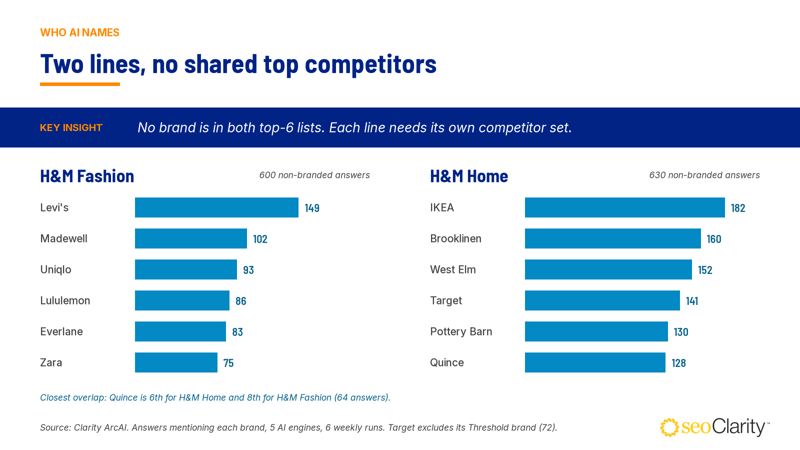
Do AI Engines Showcase Each Line of Business the Same Way?
No. Visibility also varies by AI platform, and those differences aren't consistent across product categories.
In our non-branded answers, H&M's fashion line appeared most often in ChatGPT, where it was mentioned in 16.7% of answers. Gemini had the lowest mention rate at 2.5%.
H&M Home had a different pattern. It appeared most often in Perplexity and Google AI Mode, both with a 13.5% mention rate, and least often in Copilot, at 3.2%.
These differences matter when you're evaluating performance across a portfolio. A single blended visibility score can hide which platforms drive visibility for individual brands and where each brand is being overlooked.
How to Track AI Visibility Across Brands, Sub-Brands, and Product Lines
Tracking AI visibility across a portfolio takes seven steps:
- Map the portfolio
- Find each line's real competitors
- Create a profile for each brand
- Write mention rules, write citation rules
- Separate branded from non-branded prompts
- Compare each brand against its own competitors
Each step below explains the method first, then shows how to do it in Clarity ArcAI.
Step 1: Map the Portfolio the Way AI Engines See It
Start by listing every brand, sub-brand, and line of business you want to track. Treat each as a separate unit in AI search, with its own brand identifiers, website sections, priority topics, and competitors.
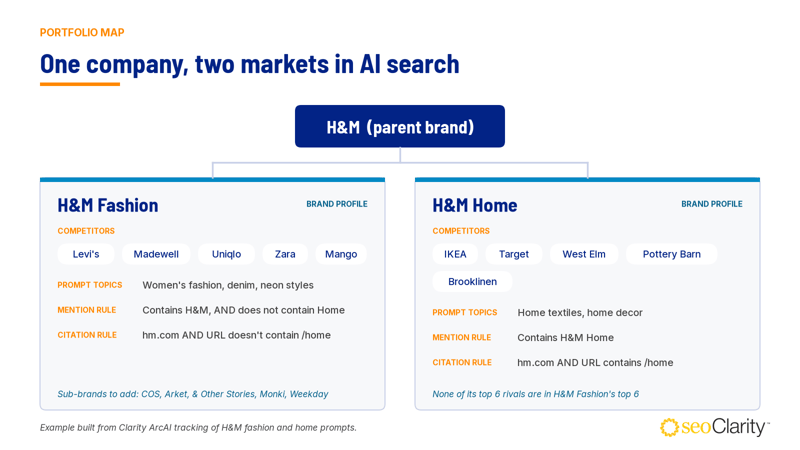 Don't stop at the parent brand. Sub-brands can earn visibility in AI answers without the parent name appearing at all.
For example, COS, an H&M Group brand, appeared in 6.8% of non-branded fashion answers, compared with 9.5% for H&M. When we counted mentions of any H&M Group fashion brand (H&M, COS, Arket, & Other Stories, Monki, and Weekday), that figure rose to 14.2%.
A map that tracks only the parent brand misses about a third of the group's visibility.
Step 2: Find Each Line's Real Competitors from AI Answers
Your competitor list should include the brands AI engines actually recommend for each category, not just your traditional business rivals.
Start by asking ChatGPT, Gemini, Perplexity, and Google AI Mode your most important non-branded questions for each line of business. Record the brands mentioned and repeat the prompts over several days to account for changing answers.
For a broader view, use Clarity ArcAI’s AI visibility tool to track prompts at scale and measure how often each competitor appears.
Keep the strategic rivals your leadership team wants to monitor, but add the brands AI engines recommend instead. In H&M's denim answers, for example, Levi's and Madewell appeared more often than Zara.
Start with five or six competitors per line, and review the list quarterly.
Step 3: Create a Brand Profile for Each Brand and Line of Business
A brand profile defines what counts as a mention or citation for one brand and, for your own brands, which competitors it should be measured against. Every brand, sub-brand, or line of business in your portfolio map should have its own profile.
In Clarity ArcAI: Performance: Go to Settings > Brand Profiles and click Add Own Brand for each brand you want to track. Add its matching rules in the drawer, then link competitors under Competitor Mapping. Use Add competitor profile to create any competitors that aren't already listed.
It’s important to note that a brand profile in Clarity ArcAI is a reporting lens on prompts your account already tracks, not a separate tracking project.
When we created the H&M Fashion and H&M Home profiles, no additional prompts were needed. Both profiles immediately displayed eight weeks of historical data. Clarity ArcAI also has no limit on the number of brand profiles, and each own-brand profile can have its own competitor set.
 Three own-brand profiles in Clarity ArcAI.
Step 4: Write Mention Rules that Separate Each Brand
Mention rules determine which brand names in an AI answer count toward a profile. They should capture common brand variations without accidentally counting competitors, sub-brands, or unrelated businesses.
Four common issues are worth watching for:
- Look-alike competitors. Zara Home appeared in 540 home answers, compared with 72 mentions of Zara. A simple "contains Zara" rule would credit Zara Home mentions to the fashion brand. Use "is Zara" or combine "contains Zara" with "does not contain Home".
- Sub-brands without the parent name. Target's home brand Threshold appeared in 72 non-branded home answers. A Target profile that matches only "Target" will miss those mentions.
- Overlapping brand names. A "contains H&M" rule also captures H&M Home and unrelated names such as H&M Meats (not related to the retailer). The H&M Fashion profile needs an additional exclusion: "does not contain Home".
- Brand variations and labels. AI answers may list "Levi's 501" separately from "Levi's", use different capitalization for "UNIQLO", or mention certification labels like GOTS and OEKO-TEX as if they were brands. Account for legitimate variations, but exclude labels that shouldn't count as competitors.
In Clarity ArcAI: Open the brand profile and go to Brand Mentions Matching Rules. Available operators include Is, Isn't, Contains, Does not Contain, RegExp, and RegExp Not Match. You can combine conditions using AND and OR.
Rule changes also apply to historical results, so you can correct a matching issue without losing your existing trend data.
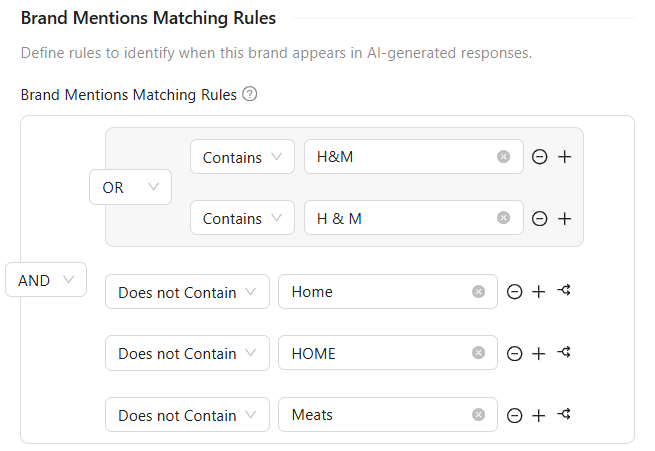
The H&M Fashion profile counts "H&M" and "H & M", and excludes the home line and an unrelated brand.
Step 5: Write Citation Rules for Each Brand's Website Section
Mention rules aren't the only thing to configure. Citation rules determine which URLs count as citations for a particular brand.
This is especially important when multiple brands or product lines share one domain. Each profile should capture citations from the relevant section of the website, rather than counting every citation from the parent domain.
In our H&M analysis, AI engines cited hm.com in 39.5% of answers to prompts about H&M Home. Most of those citations (29.9% of answers) pointed to the site's home section.
A rule combining "root domain hm.com" AND "URL contains /home" separates H&M Home citations from the rest of the site. The H&M Fashion profile can use "URL doesn't contain /home" to exclude them.
In Clarity ArcAI: Open Domain/URL Citations Matching Rules in the same brand profile drawer. Available operators include Root Domain, Sub Domain, URL Contains, URL Doesn't Contain, URL Is, URL Isn't, and URL RegExp Match. Conditions can be grouped with AND and OR.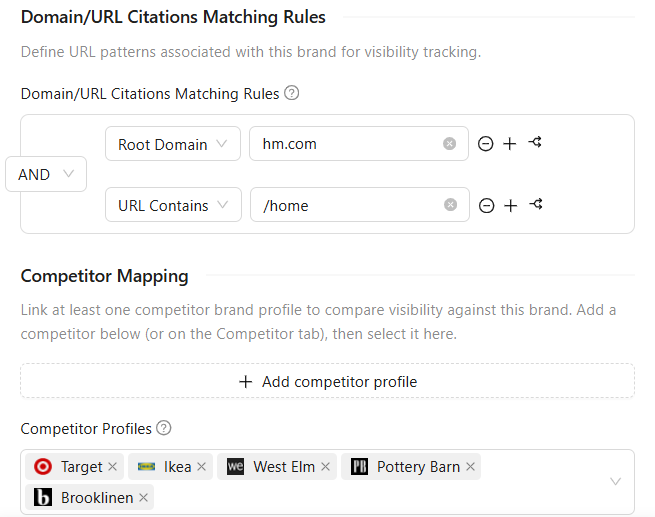
The H&M Home profile counts hm.com citations only from the home section, and maps five home-category competitors.
Check competitor citation rules, too. While preparing this article, we found a competitor profile with its website entered as "lkea.com" instead of "ikea.com". As a result, IKEA's citation rate showed 0%. Correcting the URL brought its rate to 7.6% for the same week, including historical results.
It's a small configuration mistake, but one that can significantly distort competitive reporting.
Step 6: Separate Branded and Non-Branded Prompts
Branded and non-branded prompts measure different aspects of AI visibility, so don't combine them into one performance metric.
Branded prompts explicitly name your brand. They show how AI engines describe and represent a brand when someone is already looking for it.
Non-branded prompts leave the brand out. They show whether AI engines recommend it when a buyer is still considering their options.
The difference was significant in our H&M analysis. H&M appeared in 95% of answers to branded prompts, compared with just 9.5% of answers to non-branded prompts. H&M Home showed a similar gap: 96% versus 8.4%.
Reporting these prompt types separately makes it easier to distinguish brand recognition from competitive visibility. Otherwise, strong branded results can make overall visibility look healthier than it is.
In Clarity ArcAI: Select the brand profile and relevant topics in the filter bar. Then open Advanced Filters and use Prompt does not contain with the brand name, or select the Branded / Non Branded prompt type filter.
The Details tab shows the brand's mention rate, citation rate, and performance trend against its mapped competitors. 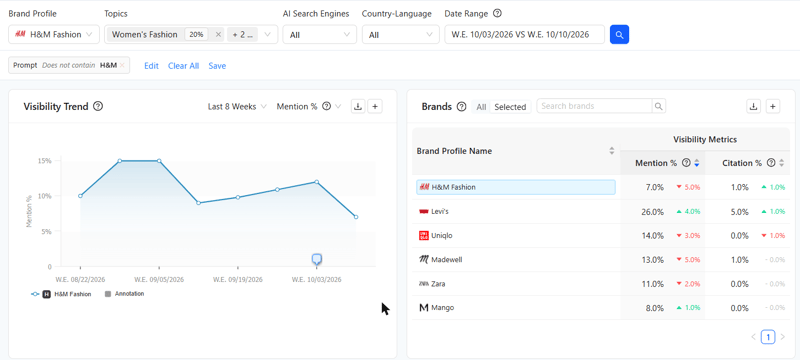
H&M Fashion on 20 non-branded fashion prompts, week ending 2026-10-10: H&M 7.0%, Levi's 26.0%, Uniqlo 14.0%, Madewell 13.0%, Zara 11.0%, Mango 8.0% mention rate.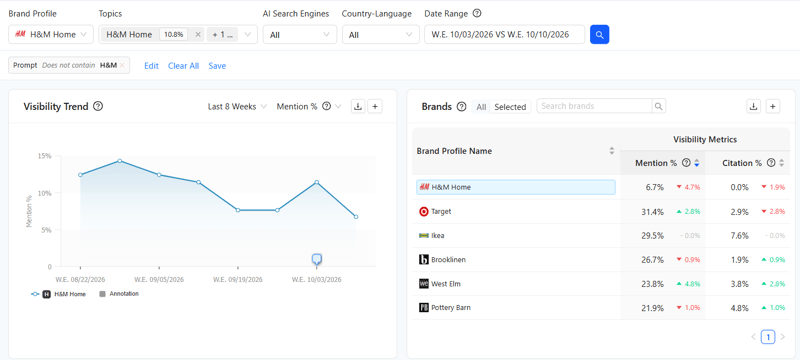
H&M Home on 21 non-branded home prompts, week ending 2026-10-10: H&M Home 6.7%, Target 31.4%, IKEA 29.5%, Brooklinen 26.7%, West Elm 23.8%, Pottery Barn 21.9% mention rate.
Step 7: Compare Each Brand Against Its Own Competitors, then Roll Up
Once each brand has its own profile, matching rules, and competitor set, you can start comparing performance.
Keep the prompts, AI engines, markets, and reporting dates consistent across competitors. That way, the brand being measured is the only variable, making the comparison more meaningful.
Brand teams can use these comparisons to identify topics, prompts, and cited sources where competitors appear but their own brand doesn't. Leadership can use a portfolio-level view to compare mention rates, citation rates, and share of voice across the business.
In Clarity ArcAI: Open the Competitive Opportunities tab with a brand profile selected. The Competitive Summary ranks the brand against its mapped competitors for mentions and citations. Below that, you'll find the topics, prompts, and citations highlighting specific visibility gaps.
You can also star a preferred profile in Settings > Brand Profiles so reports open on that brand by default.
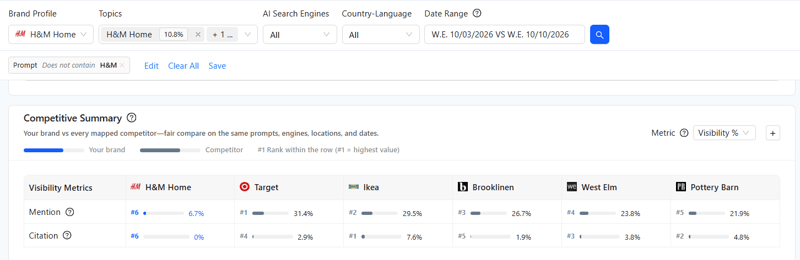
H&M Home ranks sixth of six on both mentions (6.7%) and citations (0%) against its home competitors on non-branded prompts.
How Do You Calculate AI Share of Voice for Each Brand?
AI share of voice for a brand is the number of AI answers that mention the brand, divided by the total number of answers that mention each brand in its competitor set, including the brand itself.
AI share of voice = answers mentioning your brand ÷ (answers mentioning your brand + answers mentioning each competitor)
For H&M Home against its top five home competitors: 53 ÷ (53 + 182 + 160 + 152 + 141 + 130) = 53 ÷ 818 = 6.5%. Because the denominator is the competitor set, AI share of voice changes more than any other metric when the set is wrong. Calculate it per brand, on non-branded prompts, with the competitors that AI engines name for that brand.
Which Metrics Should a Multi-Brand AI Visibility Report Include?
A multi-brand AI visibility report should use the same five metrics for every brand, so that brands can be compared and rolled up:
| Metric | What it measures |
|---|---|
| Mention rate | Share of AI answers that name the brand |
| Citation rate | Share of AI answers that link to the brand's website |
| AI share of voice | The brand's mentions as a share of all mentions in its competitor set |
| Position | Where the brand appears in the answer when it is mentioned |
| Sentiment | Whether the answer describes the brand positively, neutrally or negatively |
How Do AI Visibility Tools Handle Multiple Brands?
AI visibility tools handle multiple brands in three main ways:
- One brand per project is the most common model. Each brand, domain, or client gets its own project, prompts, and competitors. This is simple for a single brand, but a portfolio of five lines of business needs five projects. Plans may limit the number of projects or charge extra for each brand or domain.
- Separate brand reports in one account let teams create a report for each sub-brand or product line, with its own competitors and dashboard. Prompts typically come from a shared account-level pool, so teams must assign prompts to each new report before it can collect data.
- Brand profiles on shared answers let teams track one set of prompts and use the resulting answers to measure multiple brands. Each profile has its own mention and citation rules and competitor set. Adding a sub-brand requires a new profile, not new prompts, and the profile can use answers already collected. Clarity ArcAI uses this model.
The model affects three things: what it costs to add a sub-brand, how competitors are assigned, and whether a new brand has access to historical data.
Here's how the three approaches compare, based on vendors' public pricing and help pages.
| One brand per project | Separate brand reports in one account | Brand profiles on shared answers | |
|---|---|---|---|
| What a brand is | A project, workspace or domain | A report inside one account | A reporting lens on prompts already tracked |
| Adding a sub-brand | A new project, often counted against a plan limit or priced per brand or domain | A new report, with prompts assigned to it from a shared pool | A new profile; no new prompts to track |
| Competitor set | One per project | One per report | One per brand profile |
| History for a new brand | Starts when the new project starts tracking | Starts when the report's prompts start running | Available immediately from answers already tracked |
| Comparing sibling brands | Across separate projects | Across separate reports | Side by side on the same prompts, engines and dates |
The difference becomes clear when a portfolio changes. Adding a product line or sub-brand in the first two models may mean creating a new project or report and starting data collection. With shared-answer brand profiles, the team can add a profile or change a matching rule and use existing answer history.
What Should You Ask an AI Visibility Vendor About Multi-Brand Tracking?
An AI visibility tool for a portfolio must support a separate competitor set and separate matching rules for each brand. Ask every vendor these nine questions before buying:
- Is a brand a separate project, or a view of prompts the account already tracks?
- Does adding a sub-brand mean tracking, and paying for, its prompts again?
- Can each brand, sub-brand, or line of business have its own competitor set, or does the account share one list?
- Is there a limit on the number of brands or competitors, and does multi-brand tracking cost extra?
- Does a new brand start with history, or only from the day it is added?
- Can matching rules use exact match, contains, exclusions, and AND/OR logic, for both brand names and URLs?
- When a rule changes, does the change apply to past data, or does the trend line restart?
- Can reports roll up across brands and drill into one brand in the same account?
- Can every report separate branded and non-branded prompts?
Final Thoughts
AI engines answer category questions, not company questions. Each brand in a portfolio competes in its own market, so using one competitor list across the portfolio can hide important differences in visibility.
Give each brand its own profile, mention and citation rules, and competitor set to see where it stands and where it needs work.
Clarity ArcAI supports this with Brand Profiles. Teams track prompts once, then create profiles for each brand, sub-brand, or line of business, with its own competitors and matching rules.
New profiles and rule changes apply to previously collected answers, providing historical context without duplicate tracking, and there is no limit on the number of profiles.
See how your brands and sub-brands appear in AI answers.
Book a Clarity ArcAI demo.

FAQs About Tracking AI Visibility Across Brands
How do we compare AI visibility across our brands?
Compare AI visibility across brands by giving each brand its own profile and competitor set, then measuring mention rate, citation rate, and AI share of voice on the same prompts, AI engines, markets, and dates. Report each brand against its own competitors, not against one company-wide list, so each number reflects the AI answers that brand actually competes in.
How should agencies structure multi-brand AI tracking?
Agencies should treat each client brand, and each important sub-brand, as a separate unit with its own prompts, matching rules, and competitor set. A stable core prompt set keeps trend lines comparable, and separating branded from non-branded prompts shows whether AI engines recommend the client. Results should be rolled up only after each brand is measured correctly.
Which competitors should we benchmark in AI search?
Benchmark the brands that AI engines name most often in answers to your non-branded prompts, plus the strategic rivals your leadership tracks. In H&M's denim and women's fashion answers, Levi's and Madewell appeared more often than Zara. Review the competitor set every quarter, because the brands AI engines recommend change over time.
How do you calculate AI share of voice against competitors?
AI share of voice equals the AI answers that mention your brand divided by the total answers that mention each brand in your competitor set, including yours. For example, H&M Home appeared in 53 non-branded answers, and its five home competitors in 765, so its share of voice was 53 ÷ 818, or 6.5%.
Do we need a separate project for each sub-brand in AI visibility tracking?
A separate project for each sub-brand is only needed in tools that treat a brand as a project. In tools that use brand profiles on shared answers, such as Clarity ArcAI, a sub-brand is a new profile measured on prompts the account already tracks, so it needs no new prompts and starts with the history already collected.
How often should we benchmark AI visibility against competitors?
Track AI visibility weekly, and review the competitor set quarterly. Weekly tracking shows changes after AI engine updates or content changes, and quarterly reviews keep the competitor set aligned with the brands AI engines currently recommend. Compare like-for-like periods, and avoid reading trends across dates when an AI engine changed its answer format.
Methodology
The H&M data comes from a seoClarity demo account in Clarity ArcAI that tracks 97 H&M-related prompts (US, English) in ChatGPT, Gemini, Perplexity, Google AI Mode, and Copilot. The figures in the text and tables use 41 non-branded prompts over six weekly runs ending 2026-10-11 (1,230 answers). A mention is an answer whose extracted brand list includes the brand; AI share of voice counts answers, not individual mentions. Screenshot figures show a single week (ending 2026-10-10) and differ slightly from the six-week figures.

Comments
Currently, there are no comments. Be the first to post one!