



SEO and AEO teams have access to more data than ever, but getting answers from that data is still too manual.
A simple question like “Which pages lost traffic and what should we prioritize?” can mean jumping between platforms, exporting CSVs, combining datasets, and analyzing the results before you can even start making a decision. Multiply that across hundreds of questions, sites, and stakeholders, and the workflow becomes difficult to scale.
MCP servers change that. By connecting AI assistants directly to platforms like seoClarity, teams can turn natural-language prompts into agentic workflows that lead to faster insights.
To see what this looks like in practice, let’s explore real-world SEO and AEO use cases, and the prompts you can use to put MCPs to work.
Table of Contents:
- What Exactly Is an MCP Server?
- What Are Some Ways Marketers Use an MCP for AEO?
- How Can You Use an MCP Server for Technical SEO?
- How Can You Use an MCP Server for SEO Research?
- How LiveWire Brings SEO and AEO Intelligence Into ALL of Your Workflows
Key Takeaways:
- MCP servers make SEO and AEO data easier to work with. Teams can use natural-language prompts to access and analyze data without repeatedly exporting CSVs, combining datasets, or moving between platforms.
- AEO teams can investigate more than brand visibility. With the ArcAI MCP server, teams can analyze brand mentions, citation gaps, sentiment, performance across AI search engines, and how AI-generated answers position their brand against competitors.
- MCP can simplify technical SEO and competitive research. Teams can surface priority site audit issues, investigate ranking and traffic changes, analyze search demand, and uncover competitor keyword gaps through conversational workflows.
- LiveWire makes the same search intelligence available across different workflows. Teams can access seoClarity’s SEO and AEO intelligence through MCPs in AI assistants, plugins in tools like Google Sheets and Excel, or APIs in custom applications.
What Exactly Is an MCP Server?
Model Context Protocol (MCP) is an open standard created by Anthropic that connects AI assistants, like Claude or ChatGPT, to external tools and data sources.
Instead of switching between platforms to find and analyze data, you can ask for what you need in plain language. The MCP server connects the AI assistant to the appropriate tools and data to help complete the task.
seoClarity’s LiveWire brings SEO and AEO data and workflows to your AI assistant through an MCP Server. This gives you direct access to real-time search, content, and AI visibility insights (and the workflows built around them) without leaving the AI environment where you’re already working.
What Are Some Ways Marketers Use an MCP for AEO?
As AI search becomes a bigger part of the search landscape, AEO teams need to understand where, when, and how their brands appear in AI-generated answers. With the ArcAI MCP server, teams can use natural-language prompts to analyze brand mentions, sentiment, citations, and competitive visibility.
Here are a few practical ways to put it to work.
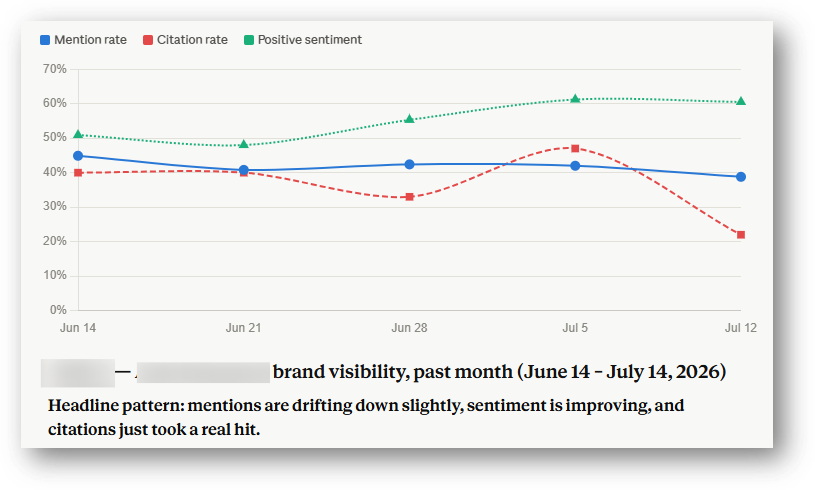
1. How to Analyze Share of Mentions for AI Search
Understand how often your brand appears in AI-generated answers in your industry and how that visibility changes over time.
- The Prompt: “For the brand profile [Your Brand] and the topic [Key Topic], analyze our brand mentions over the past month. Identify any notable trends and recommend ways we can improve brand visibility.”
- The Output: A view of your brand mention trends over the past 30 days, along with analysis of notable increases or declines and actionable recommendations for improving visibility in AI search.
2. How to Analyze a Gap in Citations for AI Search
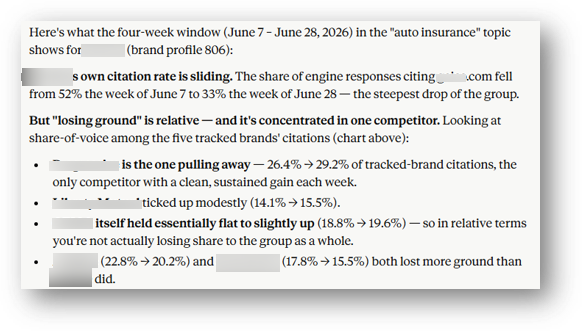
See where competitors are earning citations in AI-generated answers while your brand is losing ground. This can help uncover content and competitive gaps worth investigating.
- The Prompt: “In ArcAI, for brand profile ‘[Your Brand]’ and topic ‘[Key Topic],’ against which competitors have we lost ground for citations over the past four weeks? Analyze the types of content earning those citations.”
- The Output: A competitive view of which domains are gaining citations, along with analysis of the content associated with those gains. Use these insights to identify potential gaps and inform your content strategy.
3. How to Analyze Your Brand’s Sentiment in AI Search
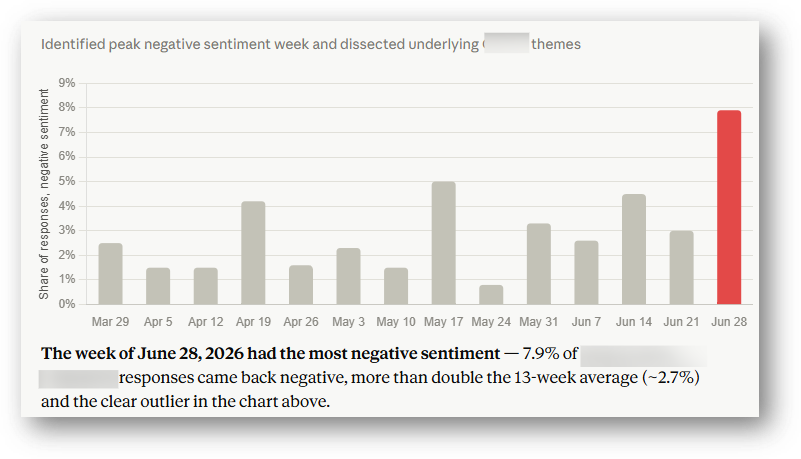
Being mentioned in AI search is only part of the picture. Understanding the context and sentiment surrounding those mentions can reveal how AI-generated answers portray your brand.
- The Prompt: “In ArcAI, for brand profile ‘[Your Brand]’ and topic ‘[Key Topic],’ which week had the most negative sentiment over the past three months? Analyze the prompts and responses contributing to that sentiment.”
- The Output: A view of the periods with higher negative sentiment and a list of the prompts and AI responses behind them. These insights can help content, brand, and PR teams identify potential reputation issues or messaging gaps.
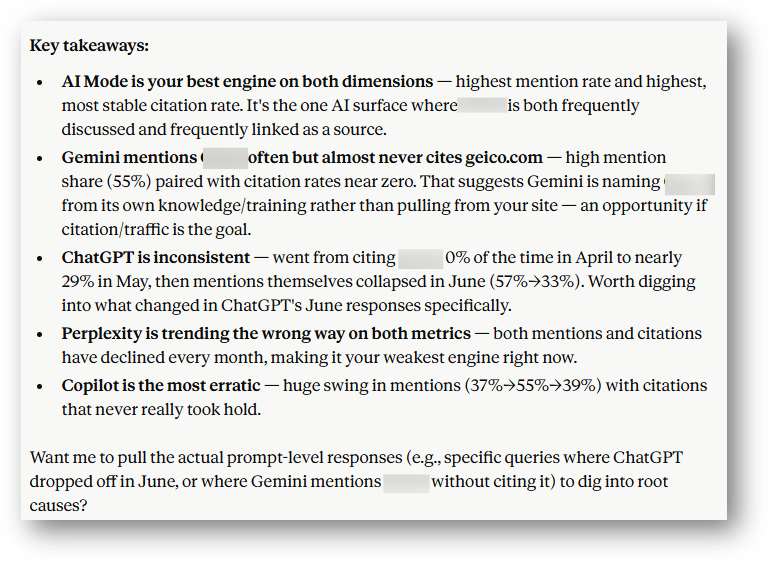
4. How to Compare Visibility Across AI Search Engines
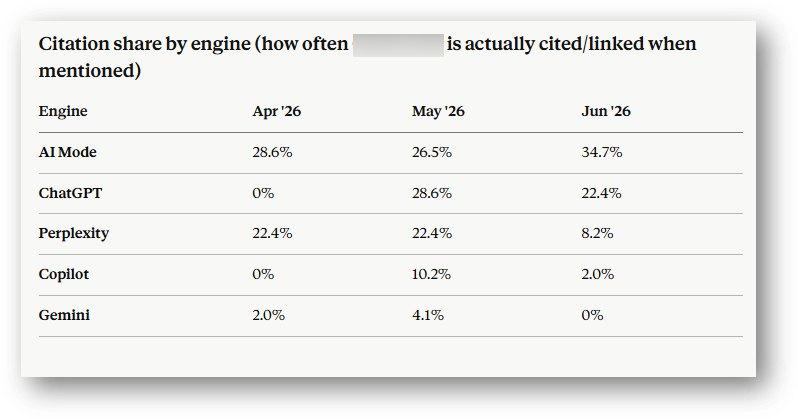
Your brand's visibility can vary significantly from one AI search experience to another. Comparing performance across platforms helps you see where your brand is gaining visibility and where there may be opportunities to improve.
- The Prompt: “For the brand profile ‘[Your Brand]’ and the topic ‘[Key Topic],’ compare our performance across the AI search engines we're tracking.”
- The Output: A side-by-side comparison of your brand's visibility across tracked AI search engines, making it easier to identify differences in performance and investigate what's driving them.
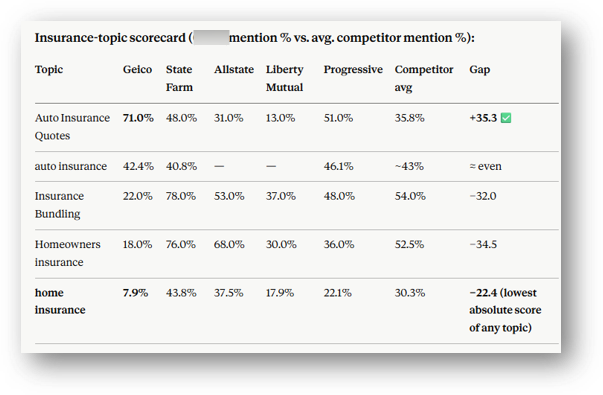
5. How to See Which Topics Over- or Underperform in AI Search
Overall visibility metrics can hide important differences between topics. Breaking performance down by topic helps identify where your brand has the greatest opportunity to improve.
- The Prompt: “For the brand profile ‘[Your Brand]’ and topics containing ‘[Keyword],’ identify the topic where [Your Brand] has the lowest share of brand mentions compared with competitors over the past four weeks. Analyze the related prompts and recommend opportunities to improve visibility.”
- The Output: A topic-level view of where your brand is underperforming against competitors, along with analysis of relevant prompts and potential opportunities to strengthen visibility.
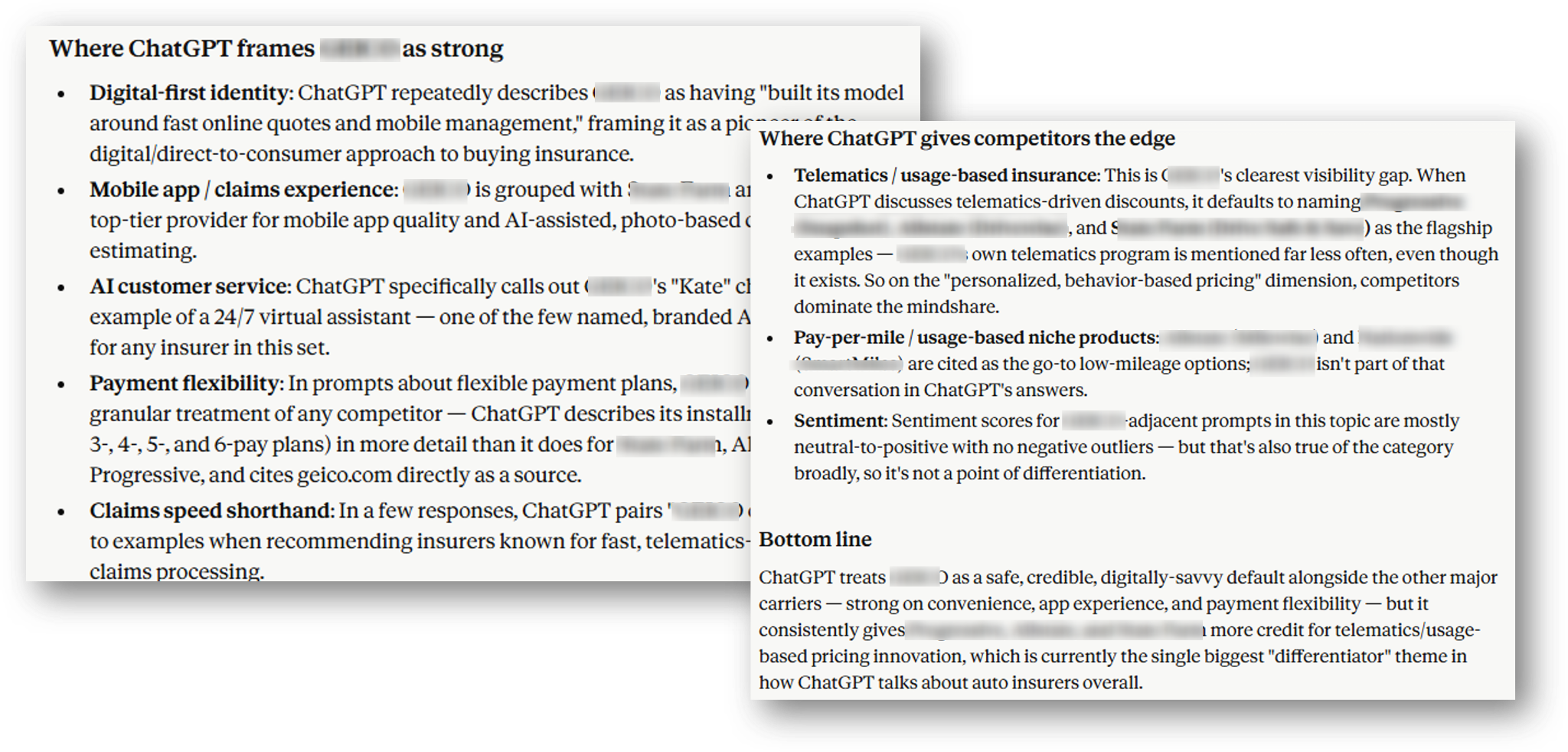
6. What Does AI Say About Your Brand’s Strengths and Weaknesses?
How AI-generated answers describe your brand can be just as important as whether your brand appears at all. Analyze those responses to understand the strengths, weaknesses, and attributes associated with your brand.
- The Prompt: “For the brand profile ‘[Your Brand]’ and the topic ‘[Key Topic],’ how does ChatGPT position [Your Brand] compared with its competitors? What strengths and weaknesses are associated with [Your Brand]?”
- The Output: A qualitative view of how your brand is portrayed compared with competitors. Use it to identify recurring themes, potential misconceptions, and areas where your content or messaging could better communicate your differentiators.
How Can You Use an MCP Server for Technical SEO?
MCP can also make it easier to investigate technical SEO and ranking data without manually pulling and combining multiple reports. Here are a few ways to use conversational prompts to surface issues and investigate changes.
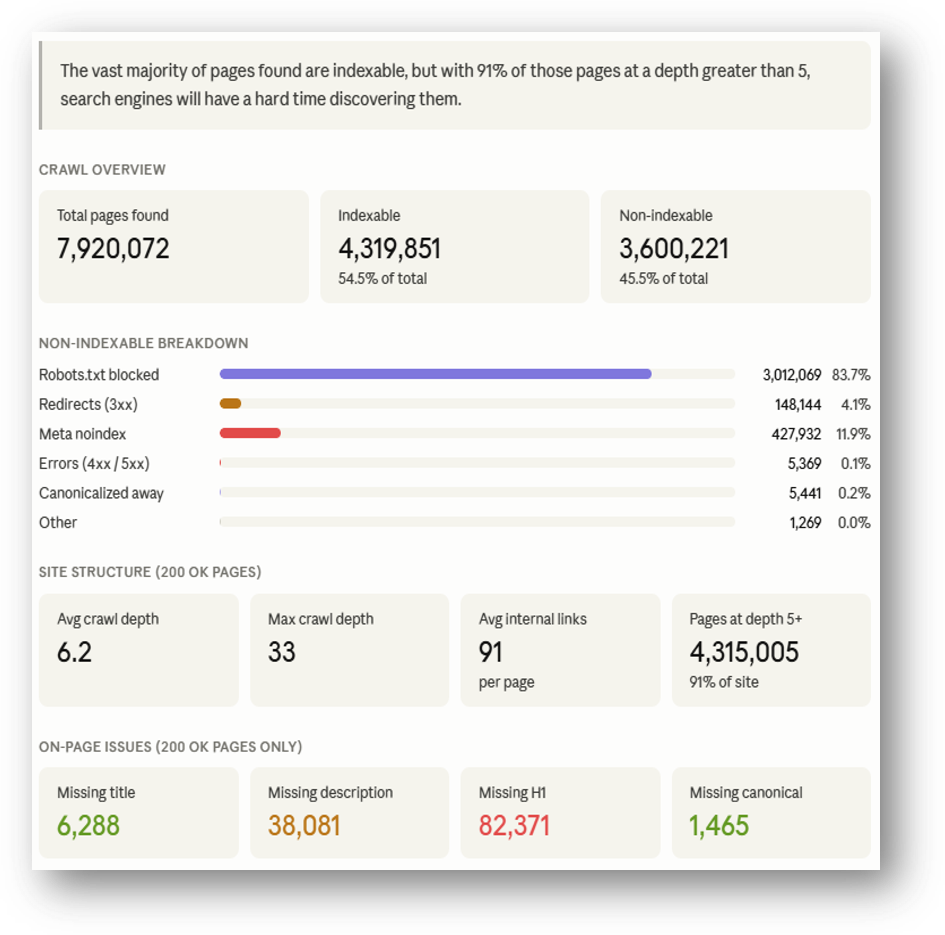
7. Surface Priority High-Impact Issues from a Site Audit
Quickly identify which issues from your latest crawl deserve attention instead of manually working through every finding.
- The Prompt: “For domain [your-domain.com], analyze our most recent crawl and identify the issues we should prioritize.”
- The Output: A prioritized analysis of crawl findings, helping your team identify technical issues that may warrant further investigation.
8. Understand Ranking Changes and Which Competitors are Winning
When rankings decline, quickly identify which keywords lost ground and which competitors moved ahead.
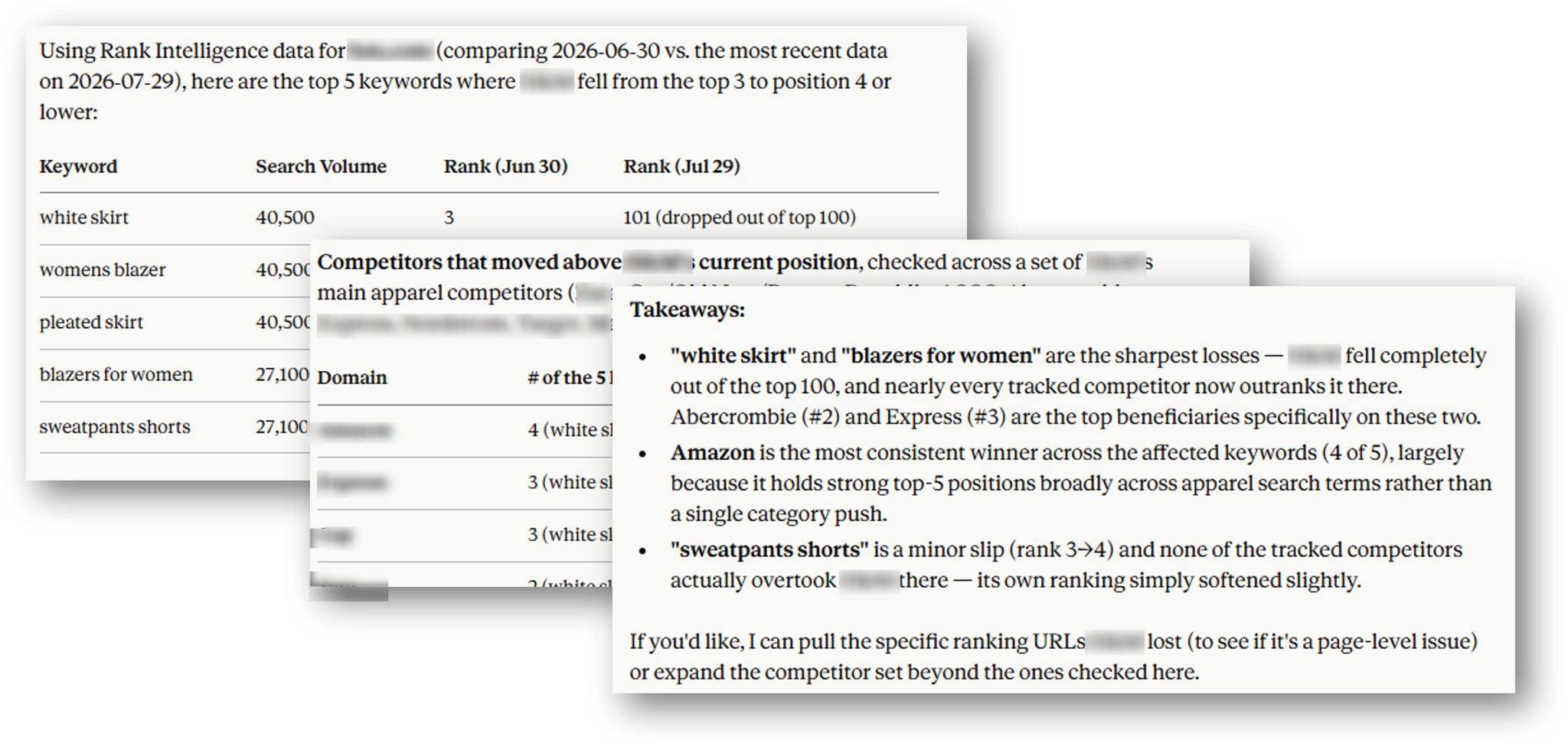
- The Prompt: “Using Rank Intelligence, what are the top five keywords by search volume where [your-domain.com] ranked in the top three a month ago but now ranks fourth or below? Which competitor domains most frequently moved above us?”
- The Output: A focused view of significant ranking losses and the competitors that gained ground, giving your team a starting point for investigating what changed.
9. How to Diagnose Traffic Loss to AI Overviews
AI Overviews and other SERP features can change how users interact with search results. Combine SERP feature and traffic data to identify keywords where those changes may warrant a closer look.
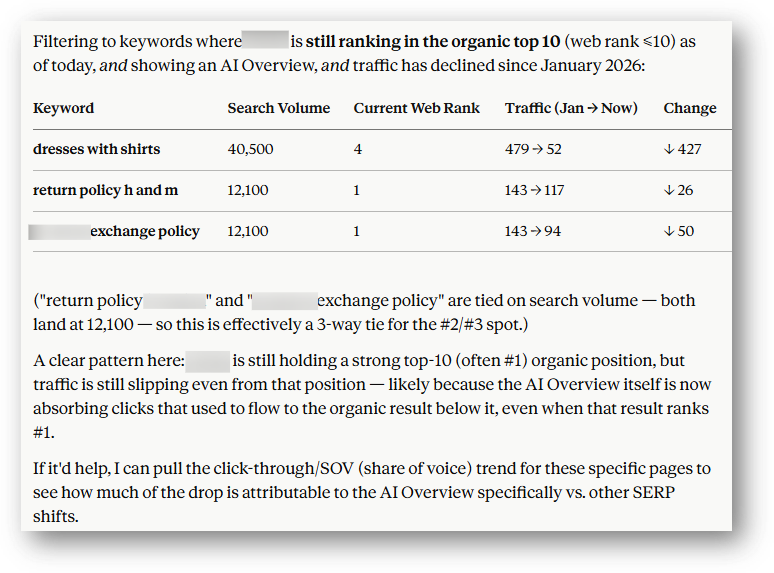
- The Prompt: “Using Rank Intelligence, what are the three highest-volume keywords currently showing an AI Overview where traffic has declined since January 2026?”
- The Output: A focused list of high-volume keywords where AI Overviews and declining traffic coincide, helping your team prioritize which SERPs to investigate further.
How Can You Use an MCP Server for SEO Research?
MCP can also speed up common SEO research tasks, from evaluating search demand to uncovering competitor keyword opportunities.
10. Spot Search Volume Shifts to Avoid Wasting Budget
Understand how demand for a topic changes over time before deciding when and where to invest in content.
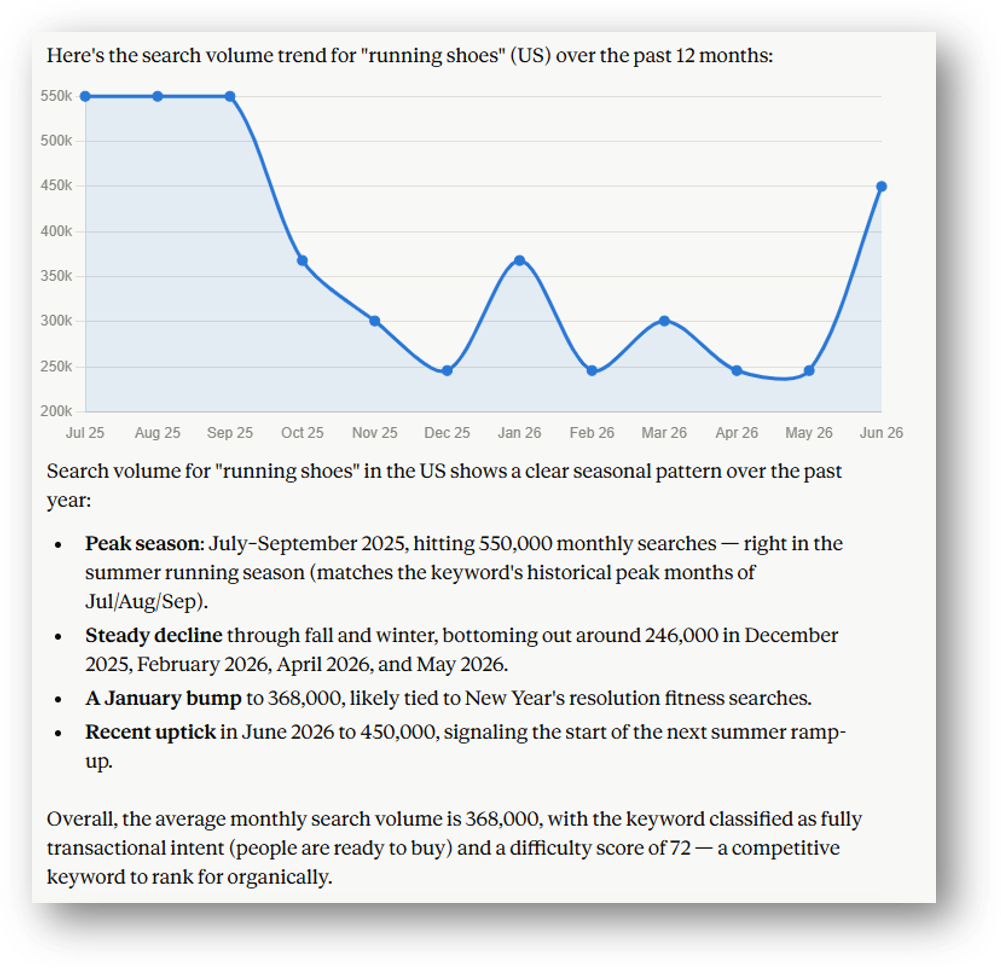
- The Prompt: “What is the search volume trend for ‘[Keyword]’ over the past year?”
- The Output: Search demand trends and seasonality over time, giving your team additional data to inform content planning and timing.
11. How to Identify Where Competitors Are Ranking and You Aren’t
Identify high-demand keywords competitors rank for that your site doesn't, giving you a focused starting point for finding content opportunities.
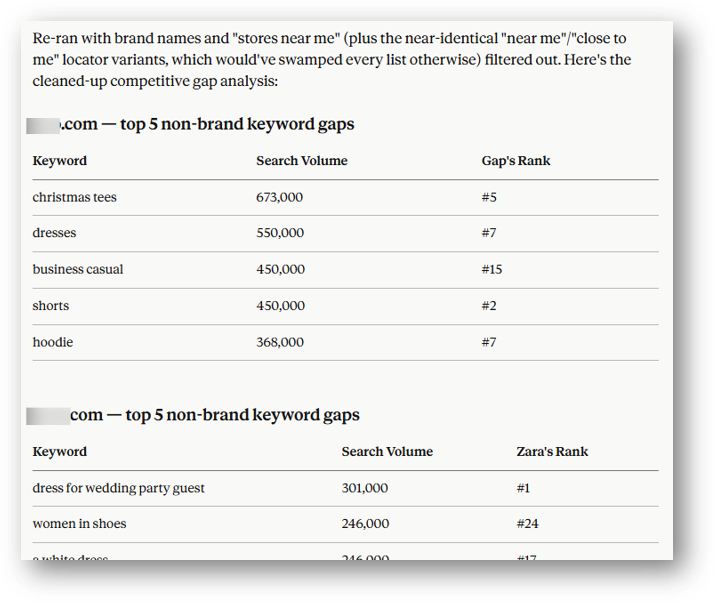
- The Prompt: “Using Research Grid, who are the top three competitors for [your-domain.com]? For each competitor, what are the five highest-volume keywords they rank for that [your-domain.com] does not?”
- The Output: A prioritized set of competitor keyword gaps that your team can evaluate for relevance and incorporate into content planning.
How LiveWire Brings SEO and AEO Intelligence Into ALL of Your Workflows
LiveWire makes seoClarity’s search intelligence available across the tools and workflows your team already uses, bringing SEO and AEO data into the flow of everyday work.
Teams can access that same search intelligence and built-in workflows in different ways depending on where and how they work:
- MCPs bring seoClarity data into LLMs like ChatGPT and Claude, where teams can ask questions and run workflows using natural language.
- Plugins bring it into tools like Google Sheets, Excel, and Looker Studio for analysis and reporting.
- APIs give technical teams the flexibility to integrate it into custom applications and workflows.
Recommended Reading: How One Brand Brought Its AI Visibility Data In-House with LiveWire
Whether your team is working in an AI assistant, a spreadsheet, a dashboard, or a custom application, LiveWire puts the same SEO and AEO intelligence within reach.

Conclusion:
AI in SEO isn't just about creating content faster. It can also change how teams access, analyze, and act on their data.
MCP servers offer one way to make that process more efficient by connecting AI assistants with the SEO/AEO platforms and data teams already use. With capabilities like Rank Intelligence, Research Grid, and ArcAI accessible through MCP, teams can use conversational prompts to analyze AI visibility, investigate technical issues, uncover competitive opportunities, and more.
The prompts above are a starting point. Experiment with the use cases that fit your workflows, refine your prompts, and look for opportunities where MCP can reduce repetitive steps and help your team get to insights faster.
Subscribe to the seoClarity blog for more AI-driven search strategies and practical guidance for navigating changes in search.


Comments
Currently, there are no comments. Be the first to post one!