



If you manage AI visibility for an enterprise, your citation report can list thousands of domains across many brands, markets, and engines, and the list shifts from week to week.
It tells you who got cited, but it doesn't tell you which sources actually bring your brand into AI answers, or what to do next.
To get from that list to a decision, you need to know which of your pages AI engines use, which sources carry your brand, and what really changed.
This guide walks through how to conduct an AI citation audit for your website in three steps:
- Find your cited pages: see which of your pages appear in AI answers.
- Measure their value: identify the sources that appear alongside your brand in relevant answers.
- Track what changed: compare citation data across dates to spot shifts in visibility.
About the data: This guide uses Clarity ArcAI, which tracks citations across ChatGPT, Gemini, Perplexity, Google AI Mode, Google AI Overviews, and Copilot. All figures and screenshots come from an H&M demo account. They show how the reports work and don't represent H&M's or any other brand's performance. Results change as AI answers and the underlying data refresh.
Table of Contents:
- Where Do You Find Your AI Citations?
- What Should You Do in Your First Fifteen Minutes?
- How Do You Audit Your Citation Profile?
- How Do You Find the Sources That Carry Your Brand?
- How Do You Spot Missing or Incorrect Citations?
- How Do You Tell What Changed?
- Why Is My Brand Not Cited at All?
- How Do You Calculate Citation Share?
- How Do You Export Citation Data?
- How Often Should AI Citations Be Tracked?
- Limits Worth Knowing
- What Should You Ask an AI Visibility Vendor?
- FAQ
- Methodology
Key Takeaways
- AI citations and AI mentions measure different things: citations show which sources AI engines reference, while mentions show whether your brand appears in the answer.
- Prompts Cited helps measure how broadly a source appears across tracked prompts.
- Citation volume alone isn't enough: compare share, engines, source types, and carrier rates to understand source value.
- Weekly comparisons help separate meaningful changes from citation turnover.
Four Citation Metrics to Understand
Every step in this audit draws on the same four numbers. Each one answers a different question about a cited domain, so reading one on its own can point you the wrong way.
Here are the four metrics for each cited domain that Clarity ArcAI reports on:
| Metric | What it measures |
|---|---|
| Total Citations | How many times the domain or its URLs appeared as a citation |
| Unique Citations | How many distinct URLs from the domain were cited |
| Prompts Cited | How many prompts cited the domain at least once |
| Citation Share % | The domain's share of all citations in the current filter |
Unique Citations counts distinct pages, not deduplicated citations. For example, if a domain is cited 300 times across four pages, the report shows 300 Total Citations and four Unique Citations. It hasn't removed duplicate citations.
Which Metric Should You Prioritize?
Start with Prompts Cited.
Total Citations can make a domain look influential because it appears repeatedly in a small number of answers. Prompts Cited shows how many individual prompts included that source at least once, giving you a better view of its reach across the questions you're tracking.
Where Do You Find Your AI Citations?
Clarity ArcAI includes citation data in six report locations. For a full audit, start with Visibility > Details > Citations. It's the main report, showing cited domains and changes across all four metrics.
| Report location | What you'll find |
|---|---|
| Visibility > Details > Citations | Every cited domain, with change across all four metrics |
| Visibility > Competitive Opportunities > Citations | The same columns, focused on competitive gaps |
| Visibility > Topics, citation tab in the drawer | The same table for an individual topic |
| Visibility > Overview | Dashboard widgets for Citation Share of Voice, Most Cited Pages, Citations by Engine, and Brand Citations Trend |
| Details and Competitive Gap Details | Mirrored citation tabs |
| Research Grid > Citations | A lighter list without change, share, or the New flag |
Set Up the Citations Report
- Open ArcAI Visibility > Details and select the Citations tab.
- Under Date Range, choose your Primary date and Comparison date. The report compares two individual dates, not two date ranges.
- Set your Brand Profile, Topics, AI Search Engines, and Country-Language filters.
- Click the blue search button to load the report.
Changing a filter chip doesn't automatically refresh the table. Click the search button to apply your selections.
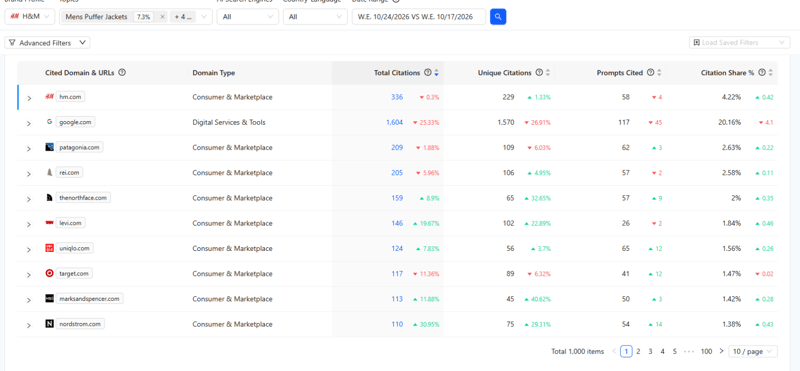
What the H&M demo shows: With a comparison date selected, the table displays changes alongside each metric. hm.com has 336 citations, down 0.3%, across 58 prompts, with a 4.22% Citation Share, up 0.42 percentage points.
Explore the Pages Behind Each Domain
The domain list tells you who gets cited. Expand a domain row to see which individual URLs are being referenced and how many times each page appears.
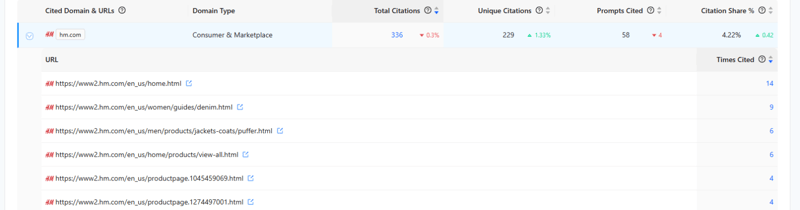
This takes the audit from domain-level visibility to specific content. You can see which pages AI engines reference and compare them with the content you publish.
Find the Prompts Behind Each Citation
Click a number in the Total Citations column to see the prompts behind a domain's citations.
For each prompt, you can view its country, language, and AI engine. The drawer also lets you open the AI response or run an Insights or Content Optimizer report.
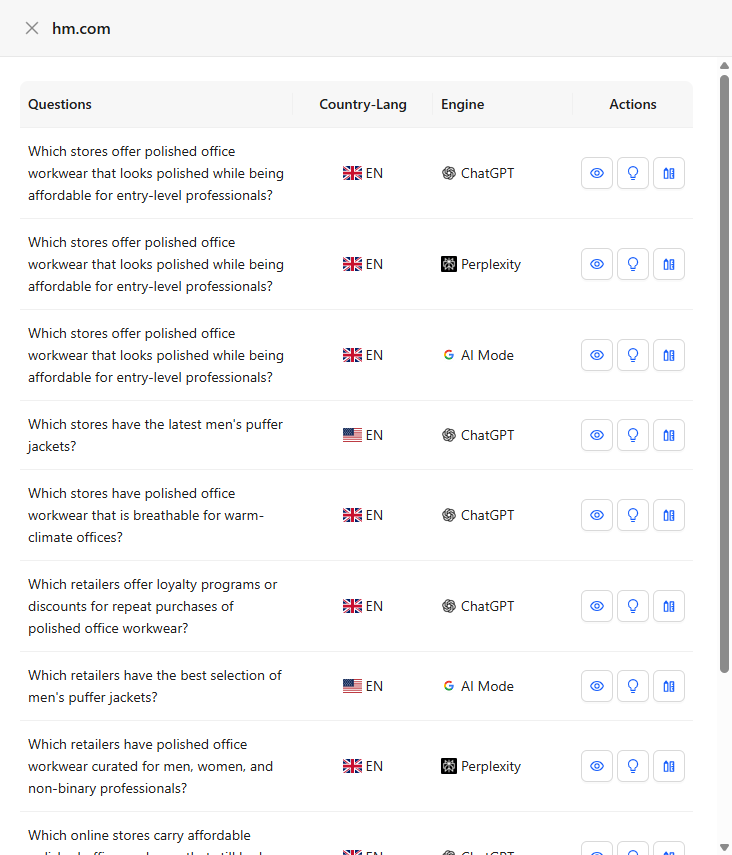
That gives you a direct starting point for investigating how a page is used and where on-page improvements might be worth exploring.
What Should You Do in Your First Fifteen Minutes?
You don't need hours of analysis to find your first useful insight. Use this 15-minute review to establish a baseline and identify one finding worth investigating.
Minutes 0–3: Set Up the Report
Select your:
- Brand Profile
- Topics
- Primary date
- Comparison date, ideally one week apart
Click "Search," then check the row count at the bottom of the table. If it reaches 1,000, you've hit the display limit. The remaining domains are available in the export.
Minutes 3–6: Find Your Domain
Locate your website in the table. In the H&M demo, hm.com appears pinned at the top with:
- 336 Total Citations
- 58 Prompts Cited
- 4.22% Citation Share
Record all four metrics, including Unique Citations, to establish a baseline for future audits.
Minutes 6–9: Check What Changed
Look beyond the raw counts. In the demo, hm.com's citations fell by 0.3%, while its Citation Share rose by 0.42 percentage points.
The two metrics tell a different story from citation volume alone. Check how they move together before deciding whether visibility has improved or declined.
Minutes 9–12: Review the Source Types
Open the Domain Type filter to see what kinds of websites cite your category.
In the demo, 582 of roughly 1,000 domains are marketplaces, compared with 167 media and publications. That suggests a more commercial than editorial source mix, even before you inspect individual domains.
Minutes 12–15: Explore Your Cited Pages
Expand your domain and review the URLs receiving citations. Compare them with the content you publish:
- Are the pages you expected to see appearing?
- Are important pages missing?
Pay particular attention to those gaps. A page you expected to find but can't may be the most useful discovery from your first review.
What's next? You now have a baseline, an initial view of what's changing, and an area to investigate. The rest of the guide takes you through a deeper audit.
How Do You Audit Your Citation Profile?
A citation report can contain hundreds or thousands of domains. Sorting by citation count won't tell you whether your AI visibility is improving.
A useful audit answers four questions:
- Did your citation volume or share change?
- Which AI search engines are citing your website?
- What types of sources are citing you?
- Are those sources helping your brand appear in AI answers?
Work through each question to understand not just how often your website is cited, but where those citations come from and how relevant they are.
1. Did Your Citation Volume Change, or Did Your Share?
Compare Total Citations with Citation Share. They can move in different directions:
- Fewer citations, stable share: Your site has fewer citations, but its relative share is holding steady. The overall category may have become quieter.
- Stable citations, declining share: Your citation volume hasn't changed, but competitors are gaining citations faster.
- Fewer citations, increasing share: Your citation count is down, but your relative position is improving.
The H&M demo illustrates why both metrics matter. hm.com lost 0.3% of its citations but gained 0.42 percentage points in Citation Share. The largest cited domain in the filter had seen its citations fall by 25.33%.
Total Citations alone suggested a decline. Citation Share showed that hm.com had improved its relative position within that filter.
The takeaway: Don't judge citation performance by volume alone. Check whether your share is moving in the same direction.
2. Which AI Search Engines Are Citing You?
AI engines retrieve information independently. A change in your overall citation profile may come from one provider while the others remain relatively consistent.
The H&M demo shows how fragmented citation coverage can be. Of 5,679 cited domains:
| Number of engines citing a domain | Domains | Share |
|---|---|---|
| 1 | 4,130 | 72.7% |
| 2 | 895 | 15.8% |
| 3 | 364 | 6.4% |
| 4 | 203 | 3.6% |
| 5 | 87 | 1.5% |
Only 1.5% of domains appeared across all five engines. Most appeared on just one.
How to compare engines in Clarity ArcAI:
- Find the AI Search Engines filter.
- Select one engine.
- Run the search.
- Repeat for the other engines.
Comparing engines individually helps pinpoint where a citation change is happening. What looks like a broad visibility problem could be a retrieval change at just one provider.
3. What Kinds of Sources Cite You?
Source type adds context to citation volume. A marketplace listing and an editorial review are different kinds of sources, and the mix can indicate whether AI answers treat your category as more commercial or editorial.
In Clarity ArcAI, the Filter by Domain Type control sits above the Citations table and applies to this tab. The counts beside each type show the distribution.
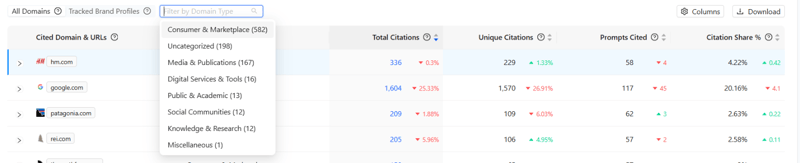
In the H&M demo, consumer and marketplace sources outnumber media and publications roughly three to one. Another 198 domains are Uncategorized, so treat the classification as a guide rather than a complete taxonomy.
4. Are These Sources Carrying Your Brand Into AI Answers?
A frequently cited domain isn't necessarily valuable to your brand. The most-cited website in a category might rarely appear in answers that mention your brand. A smaller publisher could appear much more often alongside your brand, despite having fewer citations overall.
To understand source value, distinguish between websites AI engines cite and websites that appear in answers where your brand is mentioned. The carrier-rate method below helps you do that.
How Do You Find the Sources That Carry Your Brand?
A source carries your brand when an AI answer cites that source and also mentions your brand.
You can estimate this relationship by comparing a domain's Prompts Cited count with and without a response filter for your brand name. This gives you a more useful way to prioritize sources than sorting by citation count alone.
Calculate a Source's Carrier Rate in Clarity ArcAI
Clarity ArcAI doesn't currently calculate a carrier score automatically. Instead, run the same Citations report twice, using the same filters and dates.
Run 1: Establish the baseline
- Open the Citations report.
- Set your Brand Profile, topics, and dates.
- Leave Advanced Filters empty.
- Click search.
- Record the Prompts Cited count for each domain you're investigating.
This is the total number of prompts that cited each domain, whether or not your brand appeared in the answer.
Run 2: Filter for answers that mention your brand
- Open Advanced Filters.
- Add Prompt Response · Contains · your brand name.
- Click Apply, then run the search again.
- Record Prompts Cited for the same domains.
The report now includes only answers whose response text contains your brand name. Prompts Cited shows how many of those answers also cited each domain.
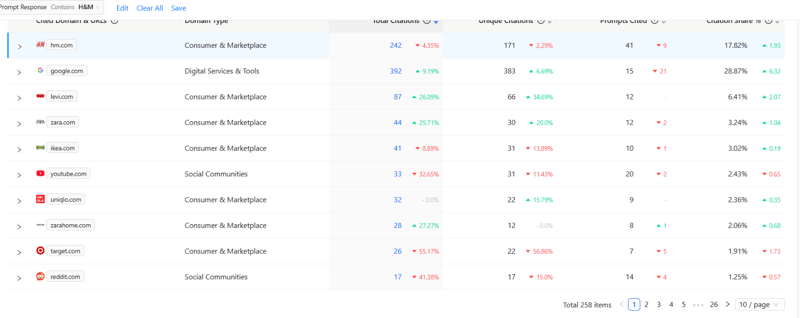
In the H&M demo, applying the response filter reduces the domain list from the 1,000-row cap to 258 domains. Prompts Cited now counts only answers where H&M appeared.
Calculate the Carrier Rate
Carrier rate = Prompts Cited in Run 2 ÷ Prompts Cited in Run 1 × 100
In other words, divide the number of prompts that both mention your brand and cite a domain by the total number of prompts that cite that domain.
The H&M demo results, using the same dates for both runs:
| Cited domain | Prompts cited, all answers | Prompts cited, answers naming H&M | Carrier rate |
|---|---|---|---|
| levi.com | 26 | 12 | 46% |
| target.com | 41 | 7 | 17% |
| uniqlo.com | 65 | 9 | 14% |
| google.com | 117 | 15 | 13% |
Why Carrier Rate Changes How You Prioritize Sources
Compare uniqlo.com with levi.com.
uniqlo.com was cited across 65 prompts, compared with 26 for levi.com. Sorting by citation count would put uniqlo.com higher.
But levi.com appeared in 12 of the 26 prompts that cited it and mentioned H&M—a 46% carrier rate. uniqlo.com appeared in just 9 of 65, a 14% rate.
Despite having fewer total citations, levi.com has a carrier rate more than three times higher. That's a very different view of source value.
Don't Overlook Domains That Disappear
Domains that don't appear in the filtered results can be just as interesting as those with high carrier rates.
In the H&M demo, these domains appeared frequently in the unfiltered report but did not appear in the filtered report's top ten:
- patagonia.com: 62 prompts
- rei.com: 57 prompts
- nordstrom.com: 54 prompts
These sources cite the category frequently but rarely bring H&M into the same answers. Depending on your strategy, they may be potential outreach opportunities—or sources you decide not to prioritize.
Two Caveats to Keep in Mind
1. The response filter matches text, not brand identity. If your brand name is also a common word, unrelated mentions can appear. If your brand has multiple names or spellings, check each variation separately.
2. Co-occurrence doesn't prove causation. A source appearing in an answer that mentions your brand doesn't mean the source caused the mention. Both may appear because of the prompt's subject.
Use carrier rate to identify useful source associations, not to prove that a particular website is responsible for your AI visibility.
How to Conduct an AI Citation Audit at Scale With LiveWire and the ArcAI MCP
Two runs per domain may work for one brand. But an enterprise tracking many brands, markets, and topics needs the same check across every source at once.
seoClarity LiveWire connects Clarity ArcAI to AI assistants such as Claude through the ArcAI MCP server. The MCP returns each tracked answer by prompt and engine, with its full text and every cited URL, labelled as your brand, a competitor, or neither.
Ask the assistant to compare the sources cited across all answers with those cited in answers that name your brand, and it calculates the carrier rate for every domain, for each of your brand profiles and topics, without manual matching.
How Do You Spot Missing or Incorrect Citations?
Check three things: expected pages that don't appear, newly cited domains that add noise, and citations that don't support the claims they're attached to.
Pages You Expected but Can't Find
Expand your own domain and compare its cited URLs with the pages you publish for those topics. A guide that performs well in organic search but never appears in the citation report may be a gap worth investigating.
New Arrivals That May Be Noise
Sort by Total Citations ascending to surface domains with a New tag. A first appearance often starts with one or two citations.
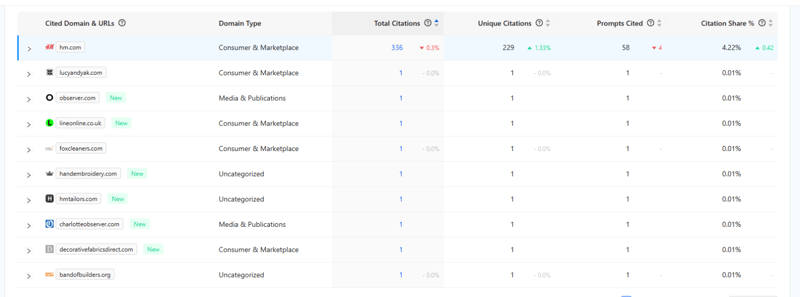
In the demo, every newly cited domain in this view arrived with a single citation. The New tag alone isn't evidence of a meaningful win. Combine it with a relevant Domain Type or set a citation-volume threshold before reporting new arrivals to a client.
Citations That Don't Support the Claim
A cited URL may not support the claim beside it. To check, open the AI response and read it with the cited source highlighted. This is something the domain table alone can't tell you.
How Do You Tell What Changed?
Compare dates far enough apart that citation turnover doesn't dominate the results.
In the H&M demo, between 38.0% and 59.3% of cited domains each week had not been cited the week before. Turnover between adjacent days was higher.
| Week ending | Domains cited | Not cited the week before | Share new |
|---|---|---|---|
| 2026-09-13 | 2,242 | 915 | 40.8% |
| 2026-09-20 | 2,212 | 841 | 38.0% |
| 2026-09-27 | 2,018 | 842 | 41.7% |
| 2026-10-04 | 1,411 | 621 | 44.0% |
| 2026-10-11 | 1,359 | 806 | 59.3% |
| 2026-10-18 | 1,247 | 508 | 40.7% |
| 2026-10-25 | 1,324 | 663 | 50.1% |
Roughly four in ten sources citing this category each week weren't cited the week before. A comparison window shorter than a week can therefore tell you more about churn than performance.
In Clarity ArcAI, set the Comparison date at least a week away from the Primary date. If you're tracking daily, compare the same weekday rather than adjacent days.
The arrows beside each metric show period-over-period change:
- Total Citations and Unique Citations: percentage change
- Prompts Cited: count change
- Citation Share: percentage-point change
Why Is My Brand Not Cited at All?
Confirming that your brand is absent takes about a minute.
Switch the Citations table to the Tracked Brand Profiles segment. The list narrows to your brand and selected competitors, making it easy to see which profiles have citations and which don't.
Fixing the absence is a separate challenge. The causes sit in content structure, entity coverage, technical access for AI crawlers, and whether authoritative third parties write about your brand.
A reporting tool can confirm the gap, but it can't fix those underlying issues. Treating it as the remedy is how teams lose a quarter.
How Do You Calculate Citation Share?
Citation Share is the percentage of citations in the current filter that belong to a particular domain.
Citation Share % = (domain citations ÷ total citations in filter) × 100
For example, 336 citations at 4.22% Citation Share implies roughly 7,962 citations across all domains in that filter.
The denominator changes with the segment selected above the table:
| Segment | Denominator |
|---|---|
| All Domains | Every cited domain matching the current filters |
| Tracked Brand Profiles | Your brand and your selected competitors |
The same domain can therefore have two correct Citation Share figures.

In the H&M demo, hm.com has 94.38% Citation Share under Tracked Brand Profiles, against gap.com's 5.62%. Under All Domains, hm.com has a 4.22% share.
These figures answer different questions:
- Tracked Brand Profiles: What share of the tracked brand set do we hold? This matches Citation Share of Voice on the Overview page.
- All Domains: What share of everything cited do we hold?
Both are valid. Make the selected segment clear in client reporting so readers know which denominator they're looking at.
How Do You Export Citation Data?
The Download control above the Citations table offers two options:
- Visible Rows: Exports the rows currently on screen, with the columns as displayed.
- Citations By Domains (Summary): Exports the full filtered list.
Both files include the change columns and a dedicated New column. Values export as plain numbers. For example, a 7.07% decline appears as -7.07, making the data ready to sort and pivot without cleanup.
Exports are also the practical way to calculate carrier rates across the full domain list:
- Download the Summary file without the response filter.
- Download it again with the response filter applied.
- Match the files using the domain column.
- Divide each filtered Prompts Cited value by its unfiltered value.
How Often Should AI Citations Be Tracked?
Weekly tracking suits most brands. Daily citation checks mostly measure turnover rather than performance.
Reserve daily monitoring for a specific event that calls for closer attention, such as a site migration, campaign launch, or major piece of coverage.
Limits Worth Knowing
Keep these reporting details in mind when interpreting your results:
- The table returns up to 1,000 domains. The Domain Type counts sum to 1,001, which is the cap in practice. Use the Summary export to access the long tail.
- Comparison uses two individual dates, not two date ranges.
- A New tag means zero citations in the comparison period. It says nothing about citation quality.
- Domain Type is an automatic classification. Some sources appear as Uncategorized.
- The response filter matches text, not entities. Short or ambiguous brand names can produce unrelated matches.
What Should You Ask an AI Visibility Vendor?
Most AI visibility tools can list cited sources. The real differences are in what you can do with that data: track source-level changes, verify share calculations, inspect the original AI answers, and export usable results.
Ask these seven questions during a demo.
1. Does every cited source show its own change, or only the total?
A chart of total citations tells you something moved. Source-level changes tell you which domain moved—and where to investigate.
2. What's the denominator of Citation Share, and does it change between views?
Share without a stated denominator can't be verified. If the vendor can't explain it clearly, the figures in your client reports will be difficult to validate.
3. Can I trace a number back to the AI answer that produced it?
Ask the vendor to click a citation count until the original answer appears. Count the clicks. The shorter the path, the easier it is to investigate the data.
4. Can I separate cited sources by AI engine?
In the demo account, 72.7% of cited domains appeared on just one engine. A combined list can hide differences between providers. Ask to see the data for each engine separately.
5. How many rows does the report return, and how do I access the rest?
Every tool has a limit. A reliable vendor will explain where it is and how to export the remaining data.
6. Does the export contain numbers or strings?
A change of minus 7.07% should export as -7.07, not text with a percent sign. That determines whether the data is ready to pivot or needs cleaning.
7. Can I filter for answers that mention my brand and compare the resulting citation list with the unfiltered one?
Without this, you can't distinguish sources that appear alongside your brand from sources that simply cite your category.
A vendor who can demonstrate all seven is worth a trial. One who answers the first three with a dashboard screenshot is selling you a snapshot.
Final Thoughts
Citation reporting has been stuck at the snapshot for as long as AI search has been measurable. Knowing who cites your website is useful once. Knowing which sources carry your brand, which ones arrived this week, and which are losing share is what turns a report into a decision.
Clarity ArcAI brings citation discovery, auditing, and comparison together in one table. You can move from a cited domain to the individual answer behind it in two clicks, and run the carrier comparison using two passes of the same report rather than a separate data project.
That matters because an audit that needs a data team is unlikely to become a regular habit. One that can be completed inside a single report is much easier to run month after month.
FAQ
What's the difference between an AI mention and an AI citation? An AI mention is a brand name in the answer text. An AI citation is a source link the engine attributes the answer to. Clarity ArcAI tracks both, and the Citations tab reports the sources rather than the mentions.
How do I find out which AI answers cite my website? Open ArcAI Visibility > Details > Citations, set a Primary and Comparison date, apply your Brand Profile and Topics, then click search. Expand your domain for its cited pages, then click a citation count to read the original answers.
How do I find missing or incorrect AI citations? Compare your domain's cited URL list against the pages you publish for those topics, filter newly cited domains by volume, and open the response to check that a cited source supports the claim beside it.
Which cited sources actually help my brand? Run the Citations report twice, once unfiltered and once with a Prompt Response filter containing your brand name, then divide the second run's Prompts Cited by the first. In the demo account that reordering moved a domain cited across 26 prompts above one cited across 65.
Why is my brand missing from AI search citations? The Tracked Brand Profiles segment confirms absence against your competitor set in about a minute. The causes sit in content structure, entity coverage, technical access for AI crawlers and third-party coverage, which is a separate piece of work from measuring.
Why does Perplexity cite different sources than ChatGPT? Each AI engine retrieves independently. In the demo account, 72.7% of cited domains appeared on one engine alone and 1.5% appeared on all five, so a single source list describes no engine accurately.
How often should AI citations be tracked? Weekly for most brands. Shorter intervals mostly measure turnover in the source list, since 38.0% to 59.3% of cited domains changed week on week.
Methodology
Figures and screenshots come from an H&M demo account in Clarity ArcAI, queried on 2026-10-29 and 2026-11-01, and are shown for illustration rather than as a representation of any brand's performance. Values shift as AI answers and the underlying data refresh.
- Period: weekly collections from 2026-09-06 to 2026-10-25, giving seven complete week-on-week comparisons. Screenshots compare the week ending 2026-10-24 against the week ending 2026-10-17.
- Scope: five topics covering men's and women's fashion and home decor, applied identically to every figure and every screenshot.
- Engines: ChatGPT, Gemini, Perplexity, Google AI Mode, and Copilot.
- Sample: 9,157 AI answers, of which 777 cited hm.com and 8,380 did not. 5,679 distinct cited domains.
- An AI answer is one prompt, on one engine, on one collection date.
- Carrier rates come from two runs of the Citations report on the same filters and dates, the second adding a Prompt Response contains filter on the brand name. Rates are Prompts Cited in the filtered run divided by Prompts Cited in the unfiltered run.
- Brand matching in the supporting queries approximates the product's brand profile rules and excludes unrelated entities sharing part of the brand name. Screenshots use the product's rules directly.
- Correlation, not causation. A source cited in answers that name a brand does not establish that the citation caused the mention.

Comments
Currently, there are no comments. Be the first to post one!