Page speed has been a ranking factor for several years now and is only becoming more important for your site’s organic performance.
What started as another metric to determine how quickly a person will see the content they've requested has turned into a core indicator of the site's overall user experience.
Pages that load faster deliver content quicker, and in that, satisfy the user's needs quicker.
Latest data suggests that the average website takes about 1.9 seconds to load its main content on mobile devices (75th percentile Largest Contentful Paint), according to real-user performance data derived from Google’s Chrome User Experience Report.
With AI answers taking up prime SERP real estate, fast page speed also helps ensure AI crawlers don’t deprioritize your content when choosing what to include in their summaries.
On this page, you'll learn about the following:
What is Page Speed?
Page speed is defined as the length of time it takes to display all the content on a specific page or the length of time it takes for a browser to receive a web server’s first byte (or, to put it in less technical terms, page speed is how long it takes for the browser to receive the first batch of information from the server).
Every page element — its HTML code, CSS that styles page elements, various JavaScript files, images, videos and other multimedia and so much more — affects the page speed. In fact, anything from an element's size (measured in kilobytes) to the speed of the web server they are hosted on will affect the page speed.
Page speed is measured on desktop and mobile devices separately. This is because of technology differences between the two, resulting in a different experience for desktop and mobile users.
Page Speed vs. Site Speed
Though they may seem similar, page speed is not the same as site speed. Site speed is the average of several sample pages on a website. Page speed, on the other hand, describes how long a person will wait to start consuming an individual page.
Why Page Speed Matters
Page speed is important to users because, well, faster pages are more efficient and provide a much better on-page user experience.
Per a recent Kissmetrics infographic, if a page takes longer than 3 seconds to load, over a quarter of users will click away and choose a different search result. Increasing bounce rate is not what SEOs are looking to do!
Mobile users expect fast load speed, too. In the same survey, 73% of users reported visiting a website with a slow loading speed. Page speed also affects conversion rate. For example, Walmart.com noted that with every second of increased page speed, they saw a two percent increase in conversion.
But, perhaps less intuitively, page speed is also important for search engine optimization (SEO).
In 2010, Google announced that page speed would be included as one of the ranking factors for their search index.
In 2017, Google announced they will give page speed even more consideration, incorporating mobile site speed to rank sites on its “mobile-first” pages, or pages that individualize rankings for mobile sites. Google is also experimenting with an Accelerated Mobile Pages Project (AMP) – a project aiming to make pages load more quickly on mobile devices.
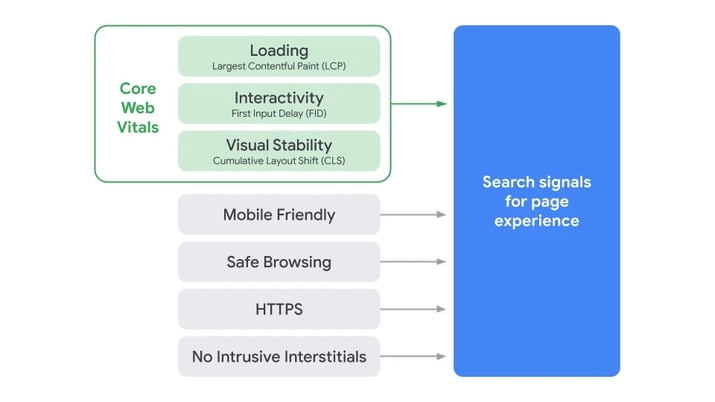
More recently, the search engine expanded the importance of the user experience by introducing Page Experience to its ranking signals. This new ranking signal combines Core Web Vitals with existing metrics like mobile friendliness and safe browsing to create search signals for overall Page Experience.
Page Experience signals aim to evaluate web pages by the quality of their user experience for real people. In short, they expand Google's recent on-page criteria with factors that affect the person's experience while consuming the content.
Needless to say, page speed is one of the most critical factors that affects it.
Recommended Reading: Cumulative Layout Shift Study of Over 1 Million Websites
Page Speed Metrics
Page speed is a complex factor tied to website performance, and to overcome any issues related to it, it pays to understand how it is being measured.
There are several metrics that affect or relate to page speed. Let's take a look at the Core Web Vitals:
- Largest Contentful Paint (LCP): This relates to a page's load time. Specifically, it represents that a page's main content has loaded appropriately.
-
Interaction to Next Paint (INP): INP measures a page’s overall interactivity by evaluating the latency of all user interactions (clicks, taps, keyboard input) throughout the page lifecycle, not just the first one.
- Cumulative Layout Shift (CLS): Highlights the instances when a page's layout shift unexpectedly, or the visual stability of the page. If a page shifts, users can accidentally click on the wrong button on a page.
Here's a visual from Google that shows how the Core Web Vitals combine with other site factors to create the Page Experience signal:
 (Image Source: Google Search Central)
Factors that Slow Pages Down
With these persuasive statistics, you certainly want to make sure your site is loading quickly. Take into consideration a few ways your site might slow down.
Lots of Images
First, a heavy image page, especially on sites with responsive or high DPI images, can load slowly. Optimizing images can make your website more lightweight; so can distributing them through a content delivery network (CDN) to render those files from location closer to where the user is.
Large Files
Another problem occurs if your web page has too many large files that must be downloaded.
Heavy JavaScript
JavaScript can slow a page down because browsers must download, parse, and execute it on the main thread, which competes with rendering and user interactions.
Large or poorly optimized scripts can delay when content appears and when the page becomes interactive.
But the impact extends beyond just the user experience. Since AI bots can’t see JavaScript, this can also prevent key content from being discovered, indexed, and used in AI-driven search results—reducing both visibility and relevance.
Server-Side Caching
Does your site leverage server-side caching of its pages?This stores copies of your web pages from a week to up to a year for less frequently updated page and can lower your TTFB (Time to First Byte).
Unused Code
Unused code, be it CSS, JS or other scripts left over in the page's HTML will also increase the page load time.
This is because unused code still has to be downloaded and processed by the browser, even if it never affects what the user sees. This adds unnecessary network weight and execution overhead.
Rendering Scripts Early or Late
Another severe problem is rendering scripts too early or too late. Often, webmasters design their pages to be consumed only after the entire content has been loaded.
However, for most users, seeing the above the fold content first is enough to start enjoying the page. This gives the browser time to load the rest of the page (all below the fold elements,) without keeping a user waiting.
Analyzing Page Speed
You might not know how users are interacting with your website if you don’t analyze page speed.
Google Lighthouse is a free, open-source tool that audits page performance, accessibility, and best practices. It is useful for diagnosing core performance issues on individual URLs and validating changes during development.
However, Lighthouse runs are inherently point-in-time and page-specific, which limits their usefulness when trying to understand performance patterns across large sites.
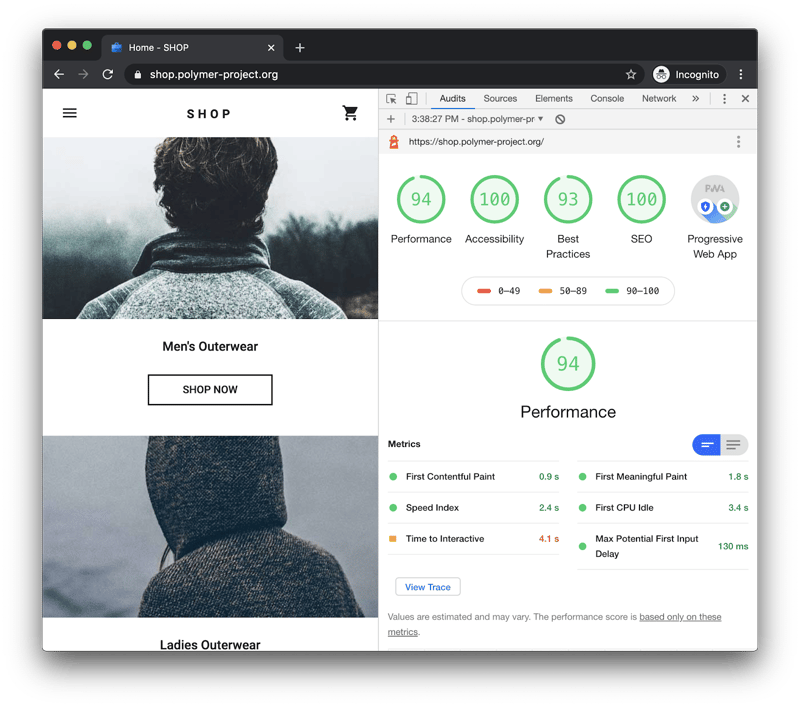
(You can run Lighthouse against any web page.)
Google PageSpeed Insights extends Lighthouse data with field metrics, but understanding how performance impacts traffic, conversions, and visibility requires analysis at scale.
seoClarity’s Page Speed Analysis builds on Lighthouse-based metrics and applies them across large URL sets, making it possible to correlate performance changes with organic traffic, conversion behavior, and revenue outcomes.
Through Clarity Audits, seoClarity runs more than 100 technical checks across millions of pages, allowing teams to identify systemic performance issues that manual Lighthouse testing cannot surface. This enables SEOs to move beyond isolated page diagnostics and prioritize fixes based on impact, scale, and business value.
Recommended Reading: Your Quick Guide to Page Speed Success
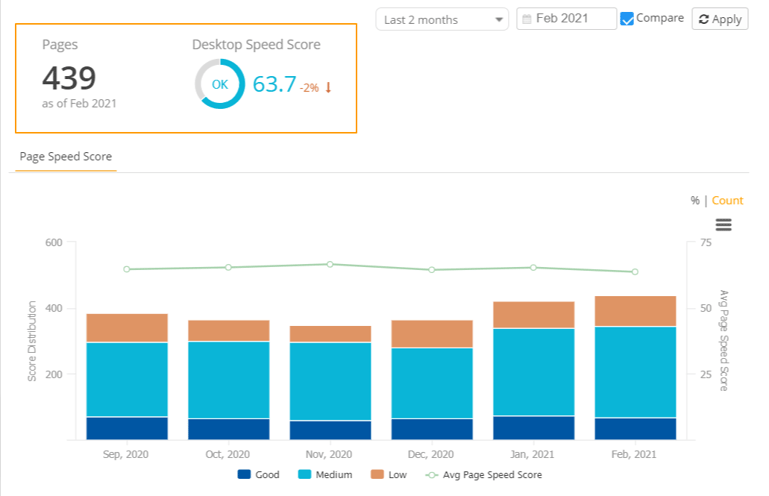
(Page Speed is based on a scoring of 0-100.)
Another view within seoClarity surfaces Lab Data, including metrics such as Largest Contentful Paint and Cumulative Layout Shift, across large sets of URLs.
This makes it possible to identify which performance issues affect the greatest number of pages, track resolution over time, and prioritize fixes that improve not only user experience, but also crawl efficiency and AI-driven visibility for performance-sensitive search systems.
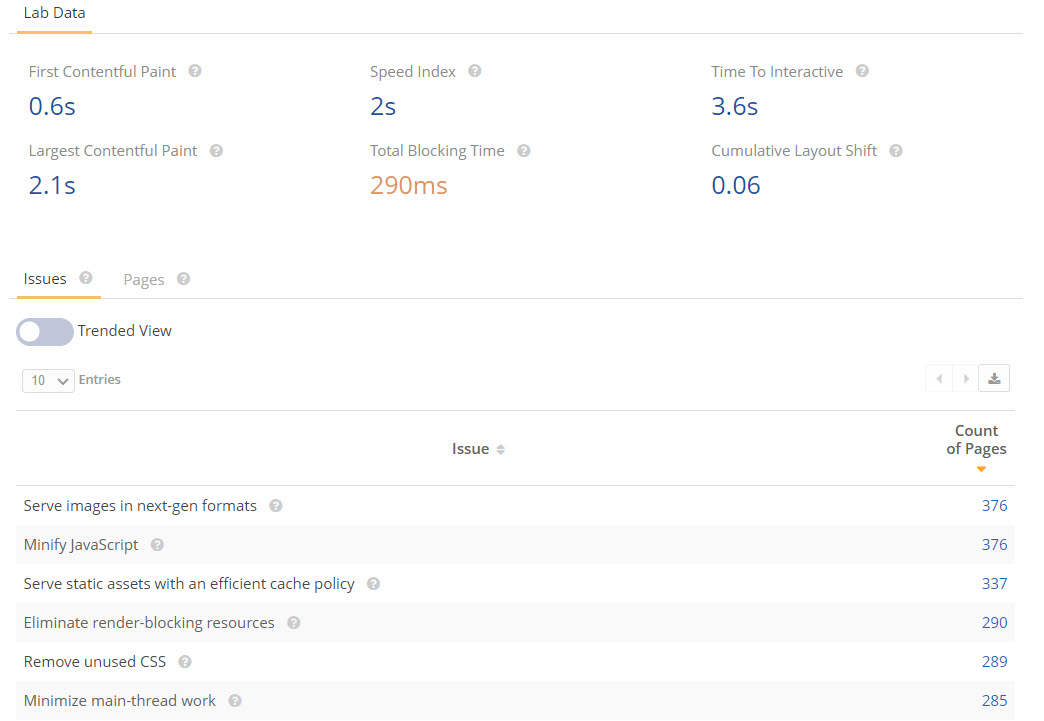
(A look at Page Speed Analysis in seoClarity.)
Conclusion
Page speed is no longer a maintenance task or a one-time optimization, it is a strategic lever.
In an environment where search engines, AI search engines and users all evaluate experience in real time, performance directly influences visibility, engagement, and revenue. Treating speed as an ongoing strategy ensures your content is accessible, interpretable, and competitive across traditional and AI search surfaces.
To operationalize speed as a strategy, focus on three repeatable actions:
Audit: Use Clarity Audits to identify high-traffic pages with poor Interaction to Next Paint (INP) scores, prioritizing issues that affect performance at scale rather than isolated URLs.
Prioritize: Optimize above-the-fold content first to ensure primary page context is accessible quickly for users, search engines, and AI scrapers that may not fully render deferred content.
Monitor: Set up weekly speed reporting in seoClarity to track performance trends and catch regressions before they negatively impact rankings, crawl efficiency, or conversions.
Editor's Note: The SEO industry changes fast! This post was originally published in January 2017 and has been updated for accuracy.